

Cvent vs. Eventbrite vs. EventsAir: Which Is Best for Event Planners?


Whether you’re planning a small meeting, a ticketed event, or a large-scale conference, choosing the right event management platform can have a significant impact on your team’s efficiency and your attendees’ experience. While Cvent and Eventbrite are two of the most recognized names in event technology, they’re designed for very different types of events and organizations.
Eventbrite is primarily built for simple event promotion, registration, and ticket sales, making it a popular choice for public events, community gatherings, and smaller-scale experiences. Cvent, by contrast, is an enterprise event management platform designed to support complex conferences, trade shows, corporate meetings, and association events with advanced registration, onsite management, reporting, and integration capabilities.
In this guide, we’ll compare Cvent and Eventbrite across key areas—including features, scalability, pricing, ease of use, and ideal use cases—to help you determine which platform is the best fit for your organization. We’ll also introduce EventsAir as an alternative for organizations that need enterprise-level event management with the flexibility to support a wide range of event types and business requirements.
Key differences at a glance
Cvent vs. Eventbrite: Detailed comparison
Cvent
Best for: Mid- to large-scale corporate and enterprise event management
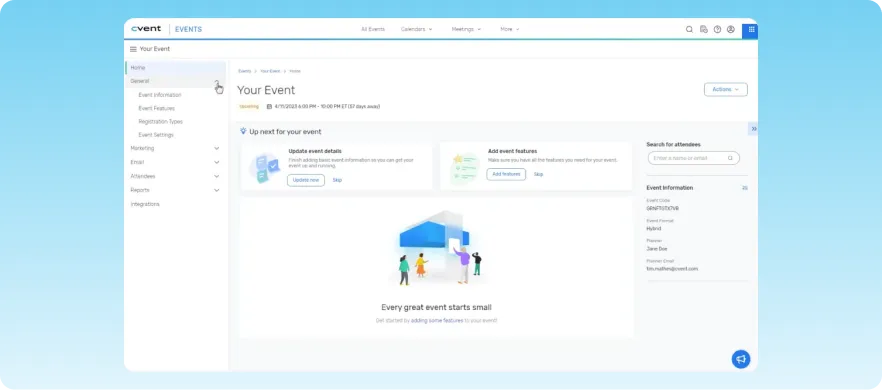
Cvent is a cloud-based event management platform designed to streamline the process of organizing and executing events. It serves as an event registration platform that comes with venue sourcing, attendee management, and analytics to support high-volume corporate and association events.
Cvent’s suite of tools includes venue sourcing, online event registration, budget management, email marketing, and web surveys. This makes it a versatile solution for large-scale in-person and virtual events, but it can be too complex for smaller events.
Key features
- Venue management: Simplifies venue search and selection with customized reports.
- Event registration: Provides online event registration with personalized paths and configurable payment management.
- Event marketing: Includes tools for creating sophisticated marketing campaigns and promotions.
- Speaker management: Centralizes speaker content and manages tasks and communications.
- Mobile event app: Offers features for attendee engagement such as chat, Q&A, polling, and gamification.
- OnArrival: Facilitates check-in and badging, attendance tracking, and real-time dashboards.
Cvent key limitations
While it offers a suite of comprehensive features, Cvent can be complex to navigate. This means that teams may spend more time and capital learning how the platform works and how it fits into their current workflows.
Cvent pricing structure
Cvent’s pricing structure is bespoke. For an accurate quote, you’ll need to contact sales. However, the company does publicly list two distinct licenses:
- Professional: Allows organizations to license only the tools they need, with core features such as user access (up to 15 logins), event reporting, speaker and session management, exhibitor tools, venue sourcing, and asset storage.
- Enterprise: Includes all core solutions (Registration, Attendee Hub, and OnArrival) plus advanced capabilities such as unlimited users, enhanced branding controls, API access, SSO and MFA security, budget management, and expanded automation and resource management tools.
Aside from these plans, you can get a quote for registration tools, the Attendee Hub, and OnArrival. Cvent also offers a range of add-on services, such as full-service on-site management, planning support, and custom integrations. Nonprofits can use Cvent at an undisclosed discounted price.
Cvent pros
- Extensive learning and support resources, including webinars, a knowledge base, and training sessions
- Handles events of all sizes with valuable customization options
- Excellent registration, audience engagement, and onsite management features
- Advanced attendee experience via Attendee Hub
- Robust reporting, analytics, and data insights
Cvent cons
- Can be complex and requires significant time to learn all its features
- Pricing may be a concern for smaller organizations
- Integration with other software systems can require extra assistance
Eventbrite
Best for: Mid-sized, public-facing events that need fast setup and simple ticketing
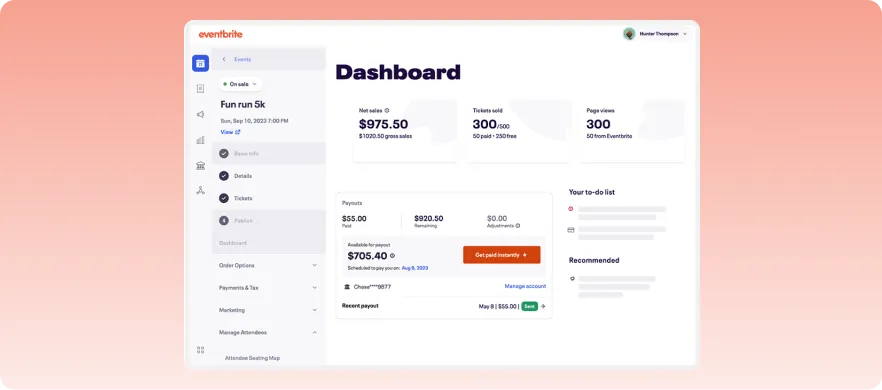
Eventbrite is a self-service ticketing platform that allows event organizers to create, share, and manage in-person, virtual, and hybrid events. As an event management tool, it’s less comprehensive than EventsAir and Cvent. However, you will find a range of marketing, ticketing, and analytics features under the hood.
Its main strength is ease of use and quick setup, which makes it particularly suitable for organizers who need to launch events without extensive technical expertise.
Key features
- Ticketing & discovery: Leading platform for event ticketing and discovery with millions of users globally.
- Payments: Event payment system with secure processing and flexible payout options.
- Event page: Customizable pages for seamless ticket purchasing and event information display.
- Event marketing: Integrated tools for targeted email marketing and social media promotion at scale.
- Eventbrite ads: Sponsored listings offering increased visibility across Eventbrite’s platform and app.
- Analytics and reporting: Robust reporting tools for tracking sales and attendee engagement.
Eventbrite key limitations
Eventbrite was built with ease of use and navigation in mind. However, it doesn’t offer as many extensive features as other event management platforms do. This makes it a good fit for small events or teams, but not ideal for larger conferences or organizers with complex even needs.
Eventbrite pricing structure
Eventbrite uses a freemium pricing model with per-ticket fees for paid events and optional paid tools for advanced features. Here’s a breakdown of its pricing structure:
- Free events: No platform fees are charged for free events. With this plan, you have access to tools for event creation, registration pages, and basic attendee management.
- Paid events: 3.7% service fee + $1.79 per ticket and around 2.9% payment processing fee per order. It includes access to features for ticket sales, checkout system, attendee management, and event listing.
- Packages: The basic package starts from 3.99% per paid ticket, depending on your location. On the other hand, the advanced package (Professional) starts around 5.99% per paid ticket, depending on your location, offering comprehensive management features. These packages are only available to select countries.
Eventbrite pros
- Intuitive and user-friendly interface
- Reasonable and accessible pricing structure
- Easy to access from anywhere, due to cloud capabilities
- Flexible pricing model that scales with ticket sales
- Good visibility for public events through the Eventbrite marketplace
Eventbrite cons
- Can be challenging to reach customer support, leading to slow issue resolution
- Limited options for customizing event pages and email templates
- Add-on tools increase overall cost
The best Cvent and Eventbrite alternative: EventsAir
Best for: Centralized event management and marketing
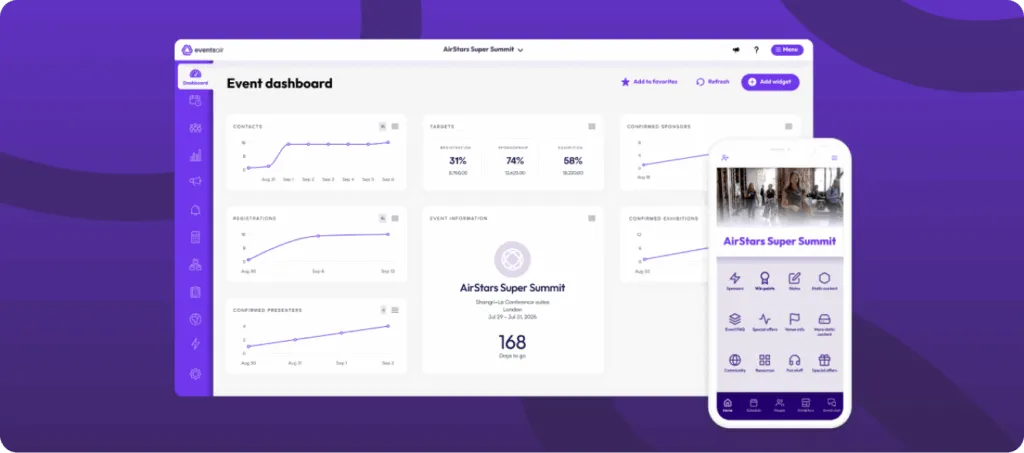
EventsAir is designed to streamline the planning, execution, and analysis of various types of events, from small meetings to large conferences and virtual gatherings. The platform supports organizers with end-to-end solutions for streamlining complex events—from planning and promotion to post-event analytics—across in-person, hybrid, and virtual events.
One of EventsAir’s biggest strengths is that it brings multiple event functions together in one platform. This means that you don’t have to juggle separate tools for registration, engagement, website building, or event operations. However, its depth can create a steeper learning curve than simpler event platforms.
Key features
- Event registration and ticketing: Supports registration form customization, attendee data management, and payment processing.
- Abstract and speaker management: Streamlines abstract management, peer reviews, and session planning for conferences and education events.
- Hotel & accommodation management: Offers integrated travel and accommodation booking for attendees and speakers.
- Attendee engagement features: Increases participation through event apps, live polling, and personalized attendee journeys.
- Air Intelligence AI tools: Uses AI-powered tools to improve attendee experiences and surface relevant event information.
- Reporting and analytics: Help teams monitor registrations, engagement metrics, and outcomes through detailed reports and dashboards.
EventsAir key limitations
Because EventsAir is designed to support complex event programs, new users may experience a steeper learning curve than they would with simpler event platforms. However, tailored onboarding, self-service learning resources, and guided training help teams get up to speed quickly and take full advantage of the platform’s extensive capabilities.
EventsAir pricing structure
EventsAir pricing structure involves three quote-based plans:
- Single: Designed for organizations running a single event. It includes unlimited registrations, three users, all EventsAir features, data storage, and 24/7 support.
- Multi: Suited for organizations managing multiple events each year. The plan includes three or more events, unlimited registrations, unlimited users, premium support, and all the features in the single plan.
- Enterprise: A customized plan for organizations with large or complex event portfolios. It offers custom event volumes, unlimited registrations and users, all platform features, premium support, and additional scalability options.
While EventsAir does not publish pricing figures, all plans include access to the platform’s full feature set. Contact the sales team to get a quote.
EventsAir pros
- Strong support for complex events like conferences and associations
- Advanced features for registration, engagement, and analytics
- Built-in AI capabilities through Air Intelligence tools
- Scalable for both multi-event and enterprise use
- Excellent end-to-end workflow automation
EventsAir cons
- Steeper learning curve compared to simpler event tools
- Pricing is not publicly listed
Cvent vs. Eventbrite vs. EventsAir: Feature comparison table
Who should use each platform?
Here are some use-case scenarios where each platform excels:
Who should use EventsAir?
EventsAir is a great fit for professional conferences, trade shows, or association event management programs. It also works well for teams managing multiple events per year who want a consistent platform across their entire program. If customization, branding, customer support, and a seamless attendee experience are top priorities, EventsAir is your go-to.
Who should use Cvent?
Cvent is best suited to large enterprises with dedicated event operations teams and the budget to match. Its capabilities make Cvent great for teams that need to manage sponsors, exhibitors, and large attendee bases efficiently. This makes it ideal if your organization runs complex, multi-track programs like large internal summits or global trade shows.
Who should use Eventbrite?
Eventbrite works well when the priority is fast setup, easy event ticketing, and discoverability rather than complex event operations. This makes it ideal if you prioritize speed, simplicity, and visibility over advanced functionality. So, with one-off or recurring simple events that need a fast, low-friction setup, Eventbrite is certainly the way to go.
Event-type use cases
Aside from budget, event size, and your company’s needs, event type is an important factor to consider before choosing an event management tool. Below are different types of events and which platforms are best suited for each use case:
Conferences
Conferences require multi-session programming, abstract submissions, speaker portals, and onsite badge printing. EventsAir is the strongest fit for this, due to its native abstract management and full check-in infrastructure. Cvent is also a good fit, but it can be complex and expensive. However, Eventbrite is the least suited as it lacks support for structured conferences.
Trade shows and exhibitions
Trade shows demand exhibitor management, lead capture, and floor plan coordination, which both Cvent and EventsAir cater to seamlessly. EventsAir’s integrated lead management and sponsor portals make it a particularly strong choice for mid-to-large expos. Eventbrite, on the other hand, has limited exhibitor management functionality.
Association events
Associations need membership integration, recurring event management, CPD/CEU tracking, and abstract workflows. Of the three platforms we’ve discussed, EventsAir was built with this specific use case in mind. Cvent is also a great option that can be configured for association events, but it comes at a significantly higher cost.
Public and consumer events
For public-facing events, such as community events, fitness classes, and charity runs, Eventbrite’s discovery marketplace gives organizers unmatched reach. In contrast, Cvent and EventsAir place greater emphasis on event administration and registration management than on audience discovery.
Hybrid events
Hybrid events that combine in-person and virtual audiences need dedicated streaming infrastructure, virtual lobby management, and unified analytics. EventsAir is well-suited for these events because it provides hybrid event management natively. Cvent also offers hybrid features as add-ons.
Deliver smarter events with EventsAir
Selecting the right event platform comes down to understanding the type of event you’re running and the level of control, scalability, and engagement you need. While Cvent and Eventbrite are popular choices with many benefits, EventsAir offers a comprehensive solution with extensive features and strong customer support.
EventsAir stands out for its versatility, customization options, and ability to effectively manage both physical and virtual events. If you’re looking for a powerful tool that can handle all aspects of event management, EventsAir is the perfect choice.
Contact our sales team today to request a demo or find a plan that best suits your needs.
Frequently asked questions
1. What is the main difference between Cvent and EventsAir?
Cvent targets large US enterprises with deep CRM needs. EventsAir, on the contrary, offers comparable or broader functionality with stronger native hybrid and association event support, often at a lower total cost.
2. Which platform is best for hybrid events?
EventsAir provides native hybrid event management in its core platform, making it best suited for hybrid events. However, Cvent offers hybrid event features as an add-on. Eventbrite has only basic live-stream support.
3. What is the best event management software for associations?
EventsAir is purpose-built for associations with abstract management, membership workflows, CPD tracking, and recurring event support capabilities.
4. What is the best platform for large conferences?
For large conferences, EventsAir and Cvent are the strongest options because both have end-to-end conference management for speaker workflows and onsite operations
5. Is Eventbrite suitable for professional or corporate events?
Eventbrite is best suited for simple, public-facing events like workshops, community gatherings, and small paid events. However, while it can support basic corporate events, it lacks the advanced features needed for large-scale or complex professional conferences.
See EventsAir in action
Discover why 12,000+ event professionals trust EventsAir to deliver effortless events, every time.





Ready to transform event chaos into clarity?
With EventsAir, you’ll move from chasing logistics to creating unforgettable moments. Plan faster, act with confidence, and deliver exceptional events. Discover what’s possible with a personalized demo today.