

How to Sell Tickets for an Event (18 Strategies that Work for All Event Types)


Selling tickets for an event isn’t as simple as it may seem. It’s more than just sending out a link to potential attendees or putting tickets up online. It’s about strategy, timing, and connecting with the right people.
Whether you’ve faced challenges with ticket sales before or simply want to ensure a better outcome this time, this EventsAir guide is for you. Keep reading as we walk you through proven strategies to streamline your ticketing process, drive the best turnout, and maximize your revenue.
How ticket sales drive your event’s success
A well-executed ticketing strategy can be the difference between a successful event and one that falls flat. Here’s why ticket sales matter:
- Revenue generation: Ticket sales directly fund your event, covering expenses like venue costs, staff, and marketing. A well-planned ticketing strategy ensures profitability, providing financial stability and resources for future events.
- Gauge of interest: The rate and volume of ticket sales provide a clear picture of your event’s appeal. If sales are slow, it signals the need to refine your promotional efforts or adjust pricing.
- Attracts sponsors and partners: Strong ticket sales indicate your event has momentum and a solid audience base. This data makes it easier to attract sponsors or partners who want to tap into your event’s potential.
- Resource planning: Knowing ticket sales helps plan for event logistics, including venue size, catering, and staffing. This insight ensures you can meet attendee needs without overcapacity or underpreparedness.
- Marketing momentum: Early ticket sales create buzz, driving social proof and word of mouth. The more tickets sold, the more likely new attendees will feel confident enough to purchase tickets themselves.
- Audience engagement: Ticket sales allow you to gather key attendee information early on. When you engage with attendees during registration, you build anticipation, offer a personalized experience, and ensure you meet their expectations on event day.
Next, let’s see how to get those tickets in the hands of your potential attendees.
18 Ticket sales strategies you can implement for your next event
TL;DR
Here are the strategies covered in this section:
- Define the event and target audience
- Set ticket goals and sales timelines
- Create clear ticket tiers
- Prepare a simple ticket sales page
- Optimize the checkout experience
- Build an email list before selling
- Launch ticket sales to your email list first
- Announce ticket sales on social media
- Share speaker or performer highlights
- Use scarcity messaging
- Add time-limited offers when sales slow
- Run paid ads to reach new audiences
- Retarget people who visited the ticket page
- Partner with influencers or communities
- Set up a referral incentive
- Offer group ticket discounts
- Show social proof regularly
- Keep communicating until the event date
1. Define the event and target audience
Defining the event starts with clarity about what it is, who it is for, and why it exists. This shapes every decision that follows, from pricing to promotion.
For example, a conference designed for senior executives will not be marketed or priced the same way as one for students or first-time founders. A virtual, in-person, or hybrid event will also be marketed differently.
Understanding the target audience means identifying demographics, interests, goals, and buying behavior. This includes age range, industry, location, budget comfort, and what motivates attendance. Clear audience insight helps avoid vague messaging and weak positioning.
Audience segmentation is also important. You can group potential attendees based on their role, experience level, or intent. This allows for more focused communication later.
2. Set ticket goals and sales timelines
Setting ticket goals gives your event a clear commercial direction. This starts with deciding how many tickets you need to sell and the revenue target required to cover costs and meet expectations.
Also, consider breaking the sales process into phases. For example, you can offer early-bird sales, general sales, and last-minute offers. Each phase should have a purpose, pricing logic, and clear start and end dates.
This helps to bring structure to the process. It also helps build excitement and maintain momentum as your event date approaches.
TIP: Monitor progress along the way, so you can adjust your marketing efforts or ticketing strategy if needed to meet your goals.
Not sure how to do that? Check our detailed guide on How to Create an Event Marketing Plan in 9 Steps.
3. Create clear ticket tiers
Next, create clear and compelling ticket tiers that align with the value they offer. Each tier should provide differentiated value to cater to different attendee preferences while increasing overall revenue.
For example, if you’re selling tickets for an event with diverse audience groups, including students, professionals, executives, and VIPs, your ticket tiers can look like this:
| Ticket tier | Value offered | Typical price range |
| General admission | Access to all core sessions, standard seating, and event materials | Standard |
| Premium | Priority seating, additional workshops or sessions, and digital resources | More expensive |
| VIP | Exclusive meet and greets, backstage access, networking sessions, and premium swag | Most expensive |
| Student / discounted | Core access at a lower cost for students or early supporters | Cheapest |
| Group / corporate | Multiple tickets at a discounted rate, sometimes with reserved seating | Cheaper |
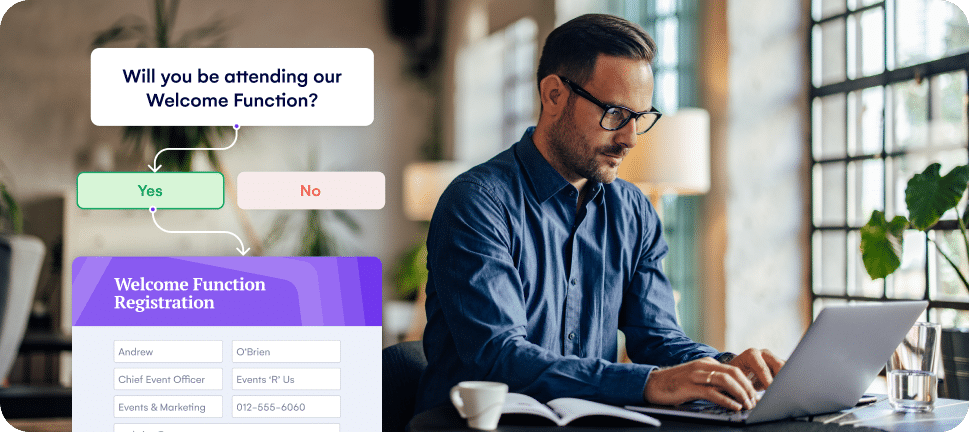
If you’re using EventsAir as your event management solution, multi-tier ticket design and sales become even easier.
You can easily set up different tiers, including VIP or virtual-only passes. You can also set pricing rules, control access levels, and track quantities per ticket. This ensures each tier is clearly defined and easy for attendees to select during registration.
4. Prepare a simple ticket sales page
Your ticket sales page is crucial for conversions. It should be clear, visually appealing, and easy to navigate. Here’s how to create an effective page:
- Highlight key details: Use bullet points to clearly compare ticket tiers and benefits. Include calls to action like "Buy now" to guide visitors.
- Engage with visuals: Add speaker photos, venue images, or short videos to build trust and excitement.
- Optimize for mobile: Ensure the page loads quickly and is responsive on all devices to reduce drop-offs.
- Simplify the layout: Keep essential info above the fold and minimize clicks to the purchase section.
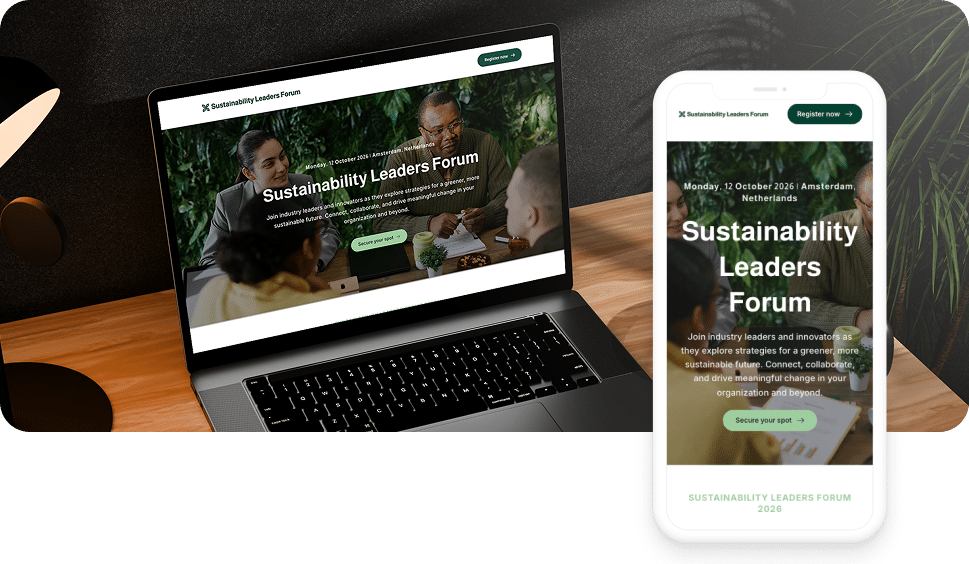
EventsAir makes this step straightforward. With our platform, you can create branded event websites and registration pages directly and display multiple ticket tiers clearly.
5. Optimize the checkout experience
A ticket sales page is only half the story. You also need to make the checkout process smooth so potential buyers don’t abandon their tickets.
Only ask for essential information and avoid lengthy forms that can overwhelm users. Auto-filling attendee details for returning visitors can help speed up the process and reduce friction.
It is also important that your checkout supports multiple payment methods, such as credit and debit cards, PayPal, and other popular gateways. This is another part of the ticket sales workflow where EventsAir shines.
With EventsAir Pay and our dedicated payment processing solution, you can:
- Simplify payment processing: Accept payments directly, without third-party processors.
- Offer diverse payment options: Support credit cards, Apple Pay, Google Pay, and Klarna’s "buy now, pay later."
- Ensure secure transactions: Benefit from PCI Level 1 compliance for top-tier security.
- Automate payment reconciliation: Automatically reconcile payments, saving time and ensuring accurate event finances.
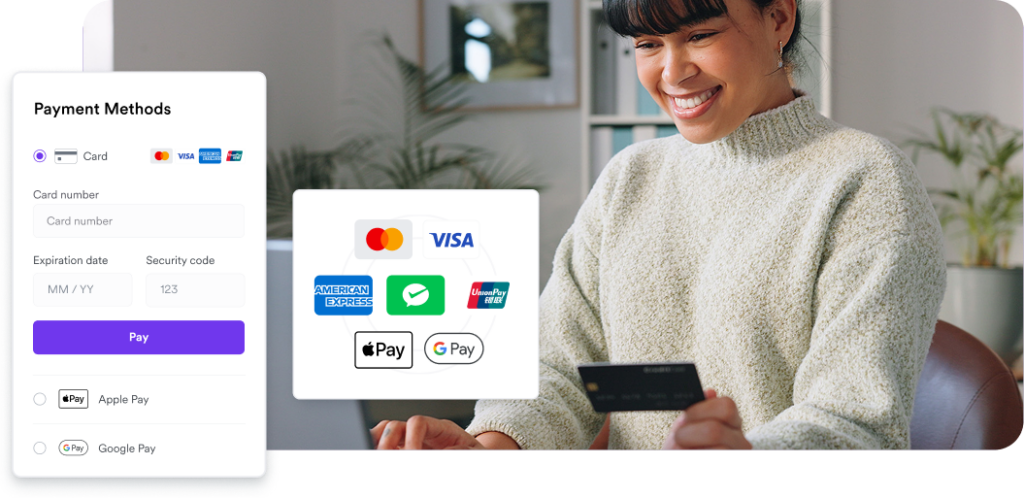
Using EventsAir Pay makes the checkout process fast, secure, and seamless for every attendee, helping convert interest into confirmed tickets.
For even more insights, here’s a Best Practice Guide to Event Payment Processing.
6. Build an email list before selling
Building an email list before you start selling tickets helps drive early interest and maximize sales. A solid email list lets you communicate directly with your most interested audience. This, in turn, increases the likelihood of early ticket sales and creates buzz around your event.
Start collecting emails early by offering incentives like early access to ticket sales, exclusive content, or discounts. Consider running a pre-registration campaign that lets people sign up for updates or alerts once tickets are live.
Once you have your list, use it to send personalized emails that highlight event details, ticket tiers, and promotions. Segment your list based on interests or past event attendance to send targeted messages that resonate with different groups.
7. Launch ticket sales to your email list first
Your email list should be the first audience to hear about ticket sales. These are people who have already expressed interest in your event, making them more likely to buy early. Launching to this group builds initial momentum and generates early social proof for other buyers.
Craft an engaging email that highlights key details, including event dates, ticket tiers, and exclusive offers. Use clear calls to action, such as “Reserve your spot now,” and include links that take recipients directly to your ticket sales page.
EventsAir elevates your email marketing by giving you:
- A centralized location to create and send on-the-fly emails.
- Templates you can use to create confirmation, pre-check-in, reminders, and any other emails.
- Drag-and-drop editor to quickly design, build and publish emails in just a few minutes.
- AI-powered content to ensure faster on-brand communications.
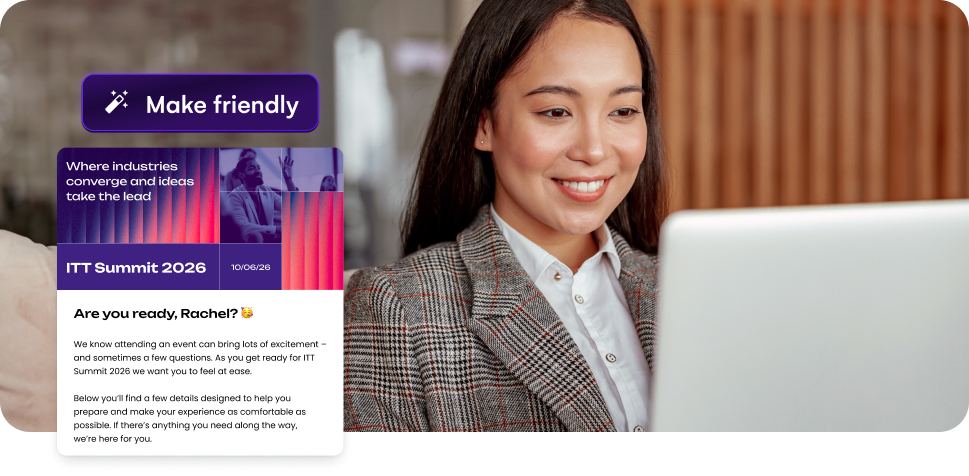
With these tools, EventsAir helps you take full control of every stage of your ticket sales launch, ensuring your early audience is engaged and ready to buy.
8. Announce ticket sales on social media
Once your email list has been notified, it’s time to announce your ticket sales on social media. Social platforms like Facebook, Instagram, and Twitter offer a powerful way to reach a wide audience and drive ticket sales.
Create eye-catching posts with clear calls to action like “Get your tickets today!” or “Don’t miss out!”. Use countdowns, teasers, and behind-the-scenes content to build excitement and encourage shares. Hashtags and targeted ads can also help amplify your reach, especially if you’re promoting to a specific audience.
Social media creates buzz and urgency, making it an essential channel for reaching new attendees and increasing ticket sales.
9. Share speaker or performer highlights
Showcasing your speakers, performers, or key attractions helps attendees understand the value of your event. Highlighting talent creates excitement, demonstrates credibility, and gives people a reason to prioritize your event over others.
Use engaging formats such as short videos, interviews, behind-the-scenes content, or sneak peeks. Include quotes, achievements, or unique event experiences that your speakers or performers bring. Visual content tends to drive higher engagement and keeps your audience interested in learning more about the event.
EventsAir supports this by allowing you to display speaker profiles, agendas, and session details directly on your event website or registration page. Your attendees can easily explore who will be at the event and what each session or performance offers. This reinforces ticket value and encourages early purchases.
10. Use scarcity messaging
Creating a sense of urgency with scarcity messaging can drive ticket sales quickly. People are more likely to act when they feel they might miss out. Highlight limited availability, whether it’s the number of tickets remaining or a special promotion with an expiration date.
Phrases like “Only a few tickets left!” or “Sale ends in 24 hours!” encourage potential buyers to make a decision faster. You can also create urgency by offering early-bird tickets or exclusive discounts for the first X buyers.
Scarcity taps into FOMO (fear of missing out) and motivates your audience to purchase tickets before it’s too late.
11. Add time-limited offers when sales slow
When ticket sales start to plateau, time-limited offers can help reignite interest and encourage quick action. Offering a flash sale, discount, or bonus content for a limited time creates a sense of urgency and can drive immediate sales.
For example, consider offering a discount on tickets or a special package for attendees who buy within the next 48 hours. You could also offer exclusive access to a webinar, a post-event networking session, or special merchandise to those who act quickly.
Time-limited offers increase urgency and reward early action. It helps accelerate sales when you need them most. Just make sure to clearly communicate the offer’s expiration to drive urgency.
12. Run paid ads to reach new audiences
Paid ads are an effective way to extend your reach beyond your immediate network and attract potential attendees who may not yet have heard about your event.
Social media platforms like Facebook, Instagram, and LinkedIn, along with Google Ads, allow you to target specific demographics based on location, interests, and behaviour.
Create compelling ad copy that highlights the event’s value, such as its speaker line-up, unique experiences, or early-bird pricing. Use engaging visuals and a clear call to action, such as “Buy Tickets Now,” to drive conversions.
You can integrate your EventsAir event site links into your ads so that traffic from paid campaigns goes straight to a seamless checkout experience. This helps convert clicks into confirmed attendees.
13. Retarget people who visited the ticket page
Not all visitors who land on your ticket sales page will complete the purchase. Retargeting ads are an effective way to bring back potential buyers who showed interest but didn’t convert. These ads can target people who have visited your registration or ticket page but left without buying.
Showing these visitors targeted ads helps remind them of the event. It should highlight limited-time offers or scarcity messaging and encourage them to complete their purchase. Retargeting ads are cost-effective and can drive higher conversion rates because you’re reaching an audience already familiar with your event.
14. Partner with influencers or communities
Collaborating with influencers or niche communities can help promote your event to an audience that trusts their recommendations. These partnerships extend your reach and add credibility, especially if the influencer aligns with your event’s theme or industry.
That said, how you go about it also matters. So, choose influencers or community leaders whose followers match your target audience. Offer them exclusive perks, early access, or special discount codes to share with their network. This creates value for both the influencer and their audience while driving ticket sales.
TIP: Provide your shareable registration links, event landing pages, and promo codes generated from EventsAir. This makes it easy for partners to promote the event and track conversions.
15. Set up a referral incentive
Referral programs encourage existing attendees or supporters to promote your event to their networks. People are more likely to trust recommendations from friends, family, or colleagues, making referrals a powerful way to increase ticket sales.
Incentives can include discounts, exclusive perks, or small rewards for each referral that results in a purchase. Keep the process simple to track and reward participants efficiently. Communicate the program clearly so attendees know how to refer others and what they will receive in return.
16. Offer group ticket discounts
Group ticket discounts are a great way to increase sales while encouraging bulk purchases. Whether it’s for companies, schools, or social groups, offering a discount for purchasing multiple tickets at once helps increase both sales volume and attendance.
You can promote group ticket options to organizations or teams that might benefit from attending together. Also, consider offering special rates for large groups or reserved seating to make the offer even more attractive.
Group discounts are especially effective for corporate events, conferences, or networking sessions, where companies may send multiple employees. It’s a simple way to increase both ticket sales and event engagement.
17. Show social proof regularly
Social proof helps build trust and confidence in your event, encouraging more attendees to purchase tickets.
Sharing testimonials, reviews, or success stories from past events demonstrates value and credibility. Early ticket sales and attendee numbers can also serve as proof that the event is popular and worth attending.
Here’s what effective social proof looks like:
- Quotes from satisfied attendees or participants
- Short video testimonials or interviews
- Images from past events showcasing engagement
- Social media posts highlighting positive experiences
- Highlighting notable speakers, performers, or sponsors
- Displaying early ticket sales or attendee counts
EventsAir lets you display social proof elements like attendee counts, testimonials, and speaker or session profiles directly on your event website. Putting your social proof where it matters most helps potential attendees feel confident in their decision to buy tickets.
18. Keep communicating until the event date
Lastly, don’t shut out potential attendees. Maintaining regular communication with attendees helps sustain interest, reduce drop-offs, and encourage last-minute ticket sales. Consistent updates remind people about the event, provide important details, and reinforce the value of attending.
Start with social media. Instagram, YouTube, Meta, and X all offer excellent ways to keep the buzz alive. Post event teasers, share behind-the-scenes content, and encourage attendees to engage with your posts.
You can also keep the communication line active by sending email reminders, event updates, countdowns, speaker announcements, or sneak peeks of activities. Highlight deadlines, such as the early-bird deadline, VIP ticket availability, or group offers.
EventsAir facilitates attendee engagement and interaction before the event through features like personalized notifications, automated email campaigns, and a centralized communication platform.
You can also send targeted invitations, confirmations, reminders, and event updates to keep attendees informed and excited about the event.
TIP: Keep your messages concise, visually appealing, and actionable to maintain engagement.
EventsAir supports every stage of ticket sales
Selling event tickets requires strategic planning to attract attendees, build urgency, and sustain momentum. By using the strategies outlined, you can increase ticket sales and set the stage for a successful event.
EventsAir simplifies the entire ticketing and event management process with the following features:
- Customizable registration: Build tailored registration forms and ticket types to suit your audience.
- Multi-tier ticketing: Create and manage multiple ticket options, from early bird to VIP, with ease.
- Integrated payment solutions: Accept payments securely with EventsAir Pay and offer various payment methods.
- Automated communication: Send reminders, confirmations, and follow-ups to reduce no-shows.
- Real-time analytics: Track ticket sales and attendee engagement to adjust strategies as needed.
- Seamless event websites: Create branded event sites with clear ticket displays and easy registration.
Ready to simplify your ticket sales? Book a demo to see how EventsAir can help you manage and grow your event today.
See EventsAir in action
Discover why 12,000+ event professionals trust EventsAir to deliver effortless events, every time.





Ready to transform event chaos into clarity?
With EventsAir, you’ll move from chasing logistics to creating unforgettable moments. Plan faster, act with confidence, and deliver exceptional events. Discover what’s possible with a personalized demo today.