

11 Best abstract management software of 2026


Managing speaker abstracts and presentations can be a logistical nightmare without the right system. As a conference organizer, you need more than just a submission portal. You need a centralized platform that streamlines workflows, automates reviewer assignments, tracks submission statuses, and integrates with the rest of the event planning ecosystem.
That’s where purpose-built solutions like EventsAir come in. As an all-in-one event management platform, EventsAir empowers planners with a powerful abstract and presentation management module that covers the full cycle: from speaker submission and reviewer feedback to agenda integration and live session delivery, whether onsite or virtual.
In this guide, we’ll compare top abstract management systems, including EventsAir, Oxford Abstracts, OpenWater, and Ex Ordo. You’ll get a breakdown of their key features, pricing models, and the pros and cons to help you choose the best platform for your next conference or academic event.
What is abstract management software?
If you’ve ever juggled hundreds of speaker submissions in spreadsheets or scrambled to assign reviewers at the last minute, you already know the headache that comes with managing abstracts manually.
Fortunately, abstract management software is built for this exact challenge. These platforms automate the collection, review, and organization of speaker submissions, research papers, and proposals for conferences and academic events.
For example, if you’re planning a science expo, adopting the best abstract management tool for scientific conferences helps streamline peer reviews, communication, and publishing. So, instead of wasting hours on admin, you can focus on curating a strong program and delivering a standout event.
Moreover, for conference organizers dealing with tight deadlines and large volumes of content, abstract submission management software ensures nothing slips through the cracks. When integrated with your broader event tech, like registration or mobile apps, it becomes a central hub that keeps your entire team aligned and your event running smoothly.
Why is abstract management software important?
Abstract management software helps simplify event planning and improve efficiency. Without it, you’re coordinating submissions across email threads, chasing reviewers in spreadsheets, and manually updating agendas every time something changes. It’s time-consuming, error-prone, and difficult to scale.
The right software brings the whole process into one place. Submissions are collected, reviewers are assigned, notifications go out automatically, and status is visible at every stage. That consistency reduces the risk of duplicate entries, missed deadlines, and communication gaps between organizers, reviewers, and speakers.
Collaboration improves too. When everyone involved — organizers, committee members, reviewers, and presenters — works from the same system, decisions happen faster and nothing gets lost in translation.
Where abstract management software really earns its place, though, is in how it connects to the rest of your event. When it’s built into your broader event management platform rather than sitting as a separate tool, approved abstracts can flow directly into your agenda, event website, and attendee app without any duplicate data entry. For planners managing large programs with tight timelines, that seamless integration is the difference between a smooth program build and a last-minute scramble.
Data security matters here too, particularly for conferences handling unpublished research. Look for platforms with encrypted storage, controlled access, and configurable reviewer permissions to protect submissions throughout the review cycle.
Ultimately, these benefits ensure a better experience for both organizers and participants. Researchers and speakers get a smoother submission process and clearer communication, while organizers gain better visibility into deadlines, reviews, and event preparation.
Key features to look for in abstract management systems
The best abstract management system should support the full journey from submission to final program delivery. Below are some important features to consider before making a choice:
1. Customizable submission forms
Every conference has different submission requirements, so fixed forms can quickly become limiting. Look for software that lets you collect author details, affiliations, topics, keywords, file uploads, disclosures, and presentation preferences in one structured flow.
Conditional fields are also useful because they keep forms relevant to each submission type. This helps organizers reduce incomplete entries and avoid unnecessary follow-up with authors.
2. Multiple peer review options
Your review process should match the standards of your event. Some conferences need open reviews, while others require blind or double-blind peer review to protect fairness and reduce bias.
A strong abstract management system should also support scoring rubrics, reviewer assignments, conflict-of-interest controls, and multiple review rounds. This gives committees a more consistent way to evaluate submissions and make final decisions.
3. Simple reviewer dashboards
Reviewer dashboards should make the review process easier, not create more admin for the organizing team. Reviewers should be able to see assigned abstracts, deadlines, scoring criteria, incomplete reviews, and submitted feedback without needing extra guidance.
A clear dashboard also helps organizers track progress across the committee. When everyone can see what needs attention, it becomes easier to keep the review timeline on schedule.
4. Automated email communication
Abstract management involves a lot of communication, from submission confirmations to reviewer reminders and acceptance notices. Email automation helps organizers send timely updates without managing every message manually.
This is useful when dealing with large submission pools, multiple deadlines, and different author groups. It also keeps communication consistent, so authors and reviewers know what to do next.
5. Real-time editing and updates
Abstract details can change after submission, review, or acceptance. Authors may need to update presenter names, titles, files, or bios, while organizers may need to adjust session information before the program goes live.
Real-time editing helps keep these updates in one place instead of spreading changes across emails and spreadsheets. This reduces version-control issues and keeps the final program more accurate.
6. Agenda and schedule integration
Accepted abstracts should not sit in a separate system once the review process ends. With agenda and schedule integration, approved submissions can move directly into sessions, tracks, rooms, and presentation slots. This saves time for organizers and reduces duplicate data entry.
It also helps keep speaker details, session titles, and abstract information aligned across the event website, agenda, and attendee app.
11 Best abstract management software
Quick look
Now, let’s look at each abstract management software in detail.
1. EventsAir
Best for: Professional conference organizers, associations, and event teams managing abstracts across the full event lifecycle
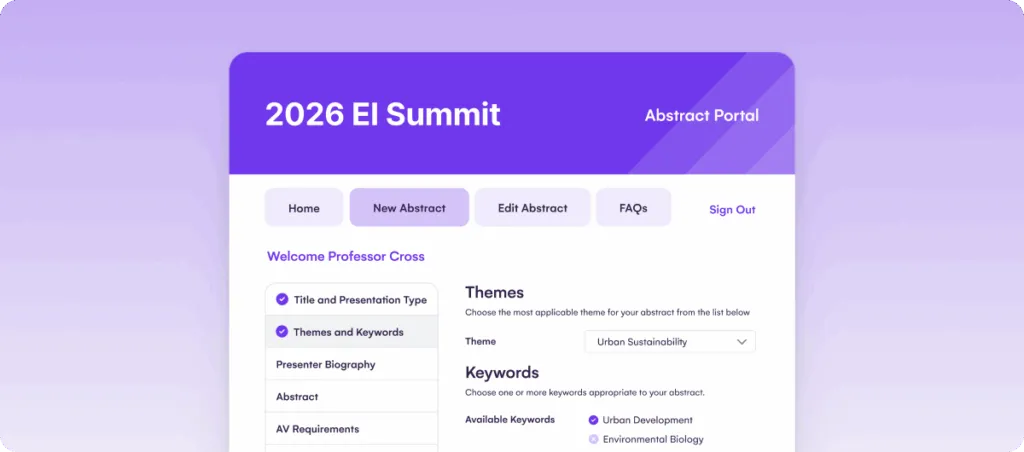
EventsAir is an all-in-one event management platform that simplifies abstract management for conferences, workshops, and other events. It allows organizers to manage abstract submissions, reviews, and scheduling in one seamless workflow. Trusted by event professionals globally, EventsAir delivers a comprehensive solution that streamlines every phase of event planning.
Key features
- Abstract management: Streamlines submission, review, and scheduling, reducing manual work and saving time.
- Reviewer assignment: Automatically assigns abstracts to reviewers based on topics, themes or keywords.

- Customizable submission forms: Adjust forms to fit the event’s needs and capture all necessary details.
- Integrated event scheduling: Syncs accepted abstracts with event schedules, simplifying session creation.

- Multi-user access: Supports collaborative work by allowing multiple users to manage submissions and reviews.
- Real-time tracking: Provides event managers with live updates on submission and review status.
- Collaboration tools: Keeps communication flowing between reviewers, presenters, and organizers.
- Advanced analytics and reporting: Offers customizable reports to track progress, analyze reviewer performance, and gather insights to improve future events.
Pricing
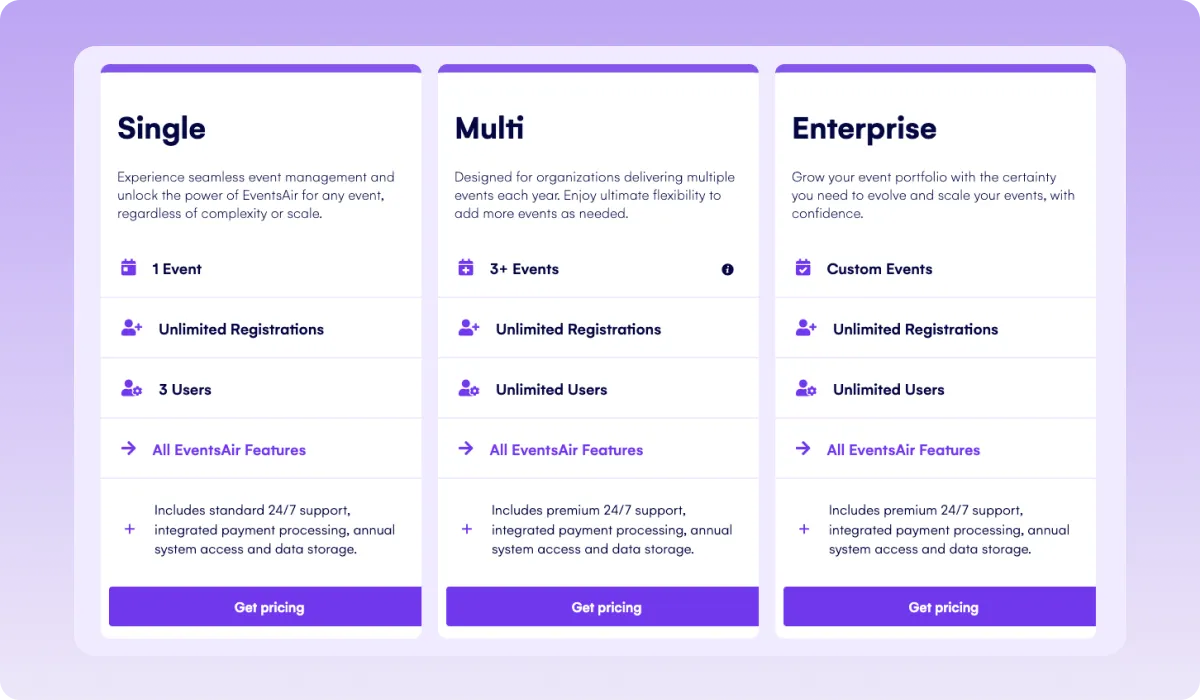
Pricing depends on the size and needs of the event. We offer custom plans for single or multiple events. Contact us for more details.
Pros
- Customizable workflows: Tailor the entire process to meet unique event needs.
- Integrated with event scheduling: Ensures abstracts are easily tied to session schedules.
- Automated reviewer assignment: Saves time by auto-assigning reviewers based on abstract topics.
- Real-time tracking: Allows managers to monitor progress instantly.
- Mobile app integration: Offers attendees easy access to abstracts via a branded mobile app.
- Comprehensive reporting: Generates detailed analytics on abstract submissions and reviews.
Cons
- Small conference organizers may find it expensive.
2. Cvent
Best for: Large enterprise conferences with abstract management inside a broader event technology ecosystem
Cvent Abstract Management streamlines the process of collecting, reviewing, and selecting content for events. It offers a customizable platform tailored to the specific needs of conferences and academic gatherings.
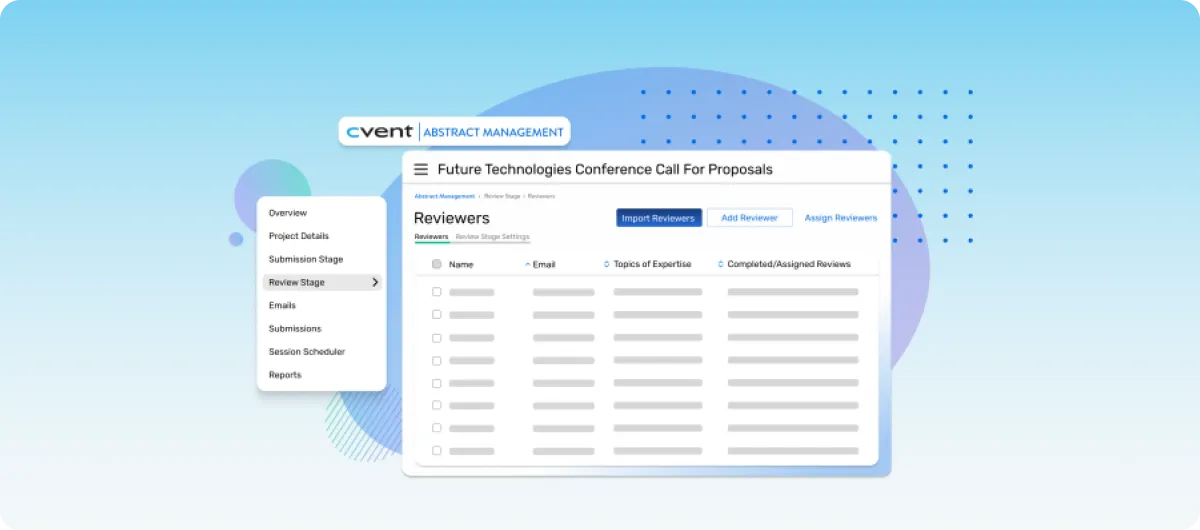
The system integrates seamlessly with other Cvent tools, providing a cohesive event management experience. However, teams outside its ecosystem may face more setup and integration work than expected.
Key features
- Customizable submission forms: Design forms to collect relevant information from authors.
- Automated reviewer assignments: Assign abstracts to appropriate reviewers based on topics.
- Blind review capabilities: Maintain impartiality by anonymizing submissions during the review process.
- Real-time tracking: Monitor the status of submissions and reviews as they progress.
- Integrated session creation: Convert accepted abstracts directly into event sessions.
- Automated notifications: Send timely updates to authors and reviewers regarding submission status.
Pricing
Cvent’s pricing is tailored to the specific needs of each event. For detailed pricing information, contact Cvent directly.
Pros
- Customizable workflows: Adapt the process to fit the unique requirements of each event.
- Seamless integration: Works well with other Cvent event management tools.
- User-friendly interface: Designed for ease of use by organizers and participants.
- Efficient reviewer management: Simplifies the assignment and tracking of reviews.
- Real-time updates: Provides up-to-date information on submission and review statuses.
- Automated processes: Reduces manual tasks, saving time and minimizing errors.
Cons
- Limited customization: Some users find the platform’s customization options restrictive.
- Integration challenges: Difficulties in integrating with other software platforms have been noted.
3. Whova
Best for: Hybrid and virtual conferences focused on attendee engagement and speaker coordination
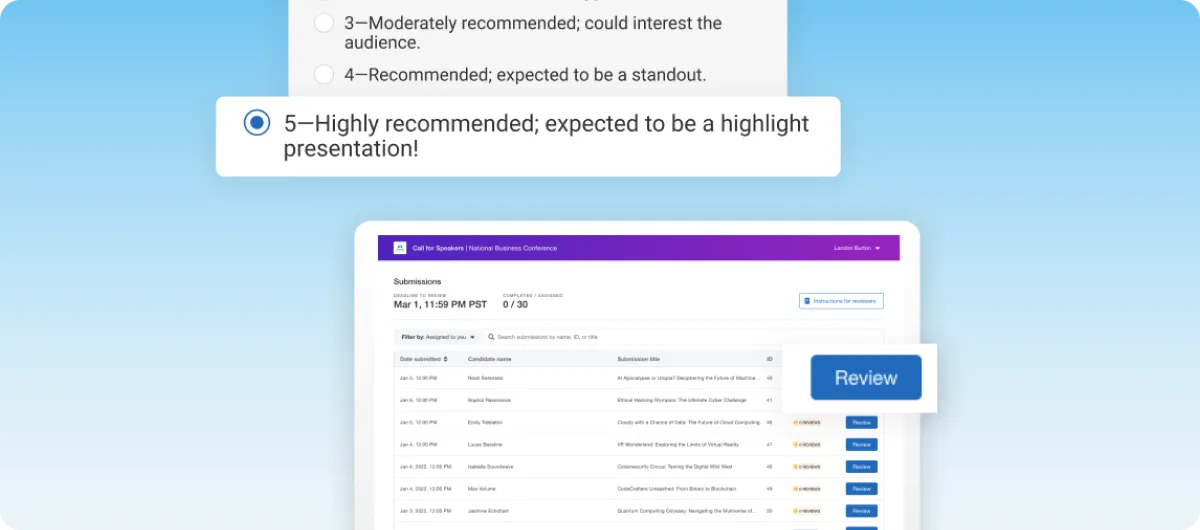
Whova’s Call for Speakers is an integrated abstract management system designed to streamline the submission, review, and selection process for events. It consolidates all tasks into a single platform, reducing the need for multiple tools and manual data entry. Although strong on engagement, abstract workflows can feel secondary when teams need full conference operations.
Key features
- Customizable submission forms: Tailor forms to collect specific information from speakers.
- Automated email notifications: Send invitations, confirmations, and reminders to speakers and reviewers.
- Reviewer assignment: Assign reviewers manually or automatically based on topics or tracks.
- Multi-criteria evaluation: Use customizable rubrics to assess submissions consistently.
- Session integration: Convert accepted abstracts directly into sessions in the event agenda.
- Speaker management: Collect and display speaker bios, photos, and presentation details.
Pricing
Whova offers tiered pricing based on the scale and features required for your event. Specific pricing details are available upon request through their website.
Pros
- Integrated platform: Combines abstract management with event scheduling and attendee engagement.
- User-friendly interface: Simplifies the submission and review process for both organizers and participants.
- Customizable workflows: Adapt the system to fit the unique needs of your event.
- Automated processes: Reduces manual tasks, saving time and minimizing errors.
- Real-time updates: Monitor submission and review statuses instantly.
- Scalable options: Suitable for events of various sizes, from small workshops to large conferences.
Cons
- Difficult navigation: Unresponsive links and readability issues.
- Notification overload: Overwhelming notifications need disabling for usability.
4. OpenWater
Best for: Conferences, awards, and grant programs with customizable submission and review workflows
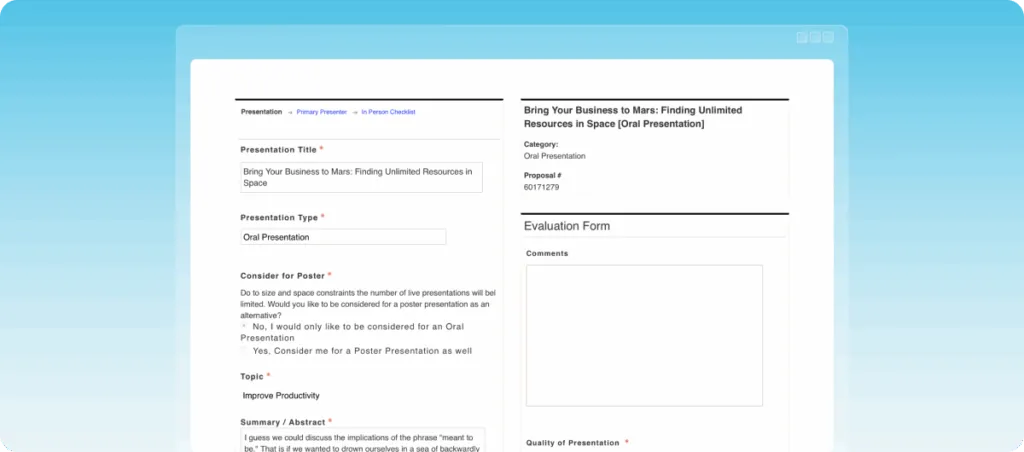
OpenWater is a platform designed to streamline the abstract submission and review process for conferences, awards, and grants. It offers a unified solution that integrates submission forms, session scheduling, and communication tools, aiming to simplify event planning and management. However, broader event marketing, attendee experience, and onsite workflows may require extra tools.
Key features
- Customizable submission forms: Design forms to collect specific information from authors.
- Multi-round review process: Facilitate multiple evaluation stages with customizable scoring criteria.
- Session builder: Organize accepted abstracts into sessions and schedules.
- Email automation: Send automated notifications and reminders to authors and reviewers.
- Mobile app integration: Provide attendees with access to schedules and abstracts via a mobile app.
- Analytics and reporting: Generate reports to track submission trends and reviewer performance.
Pricing
Third-parties estimate that OpenWater’s pricing starts at $5,250 per year for up to 3,500 submissions. Additional modules, such as mobile app integration and live chat, are available at an extra cost. For detailed pricing information, contact OpenWater directly.
Pros
- Customizable workflows: Adapt the process to fit the unique requirements of each event.
- Seamless integration: Works well with other systems like Salesforce and iMIS.
- User-friendly interface: Designed for ease of use by organizers and participants.
- Efficient reviewer management: Simplifies the assignment and tracking of reviews.
- Real-time updates: Provides up-to-date information on submission and review statuses.
- Automated processes: Reduces manual tasks, saving time and minimizing errors.
Cons
- Limited features customization: Some users find the platform’s customization options restrictive.
- Weak event marketing capabilities
5. Oxford Abstracts
Best for: Academic and medical conferences with simple abstract collection, review, and publishing needs
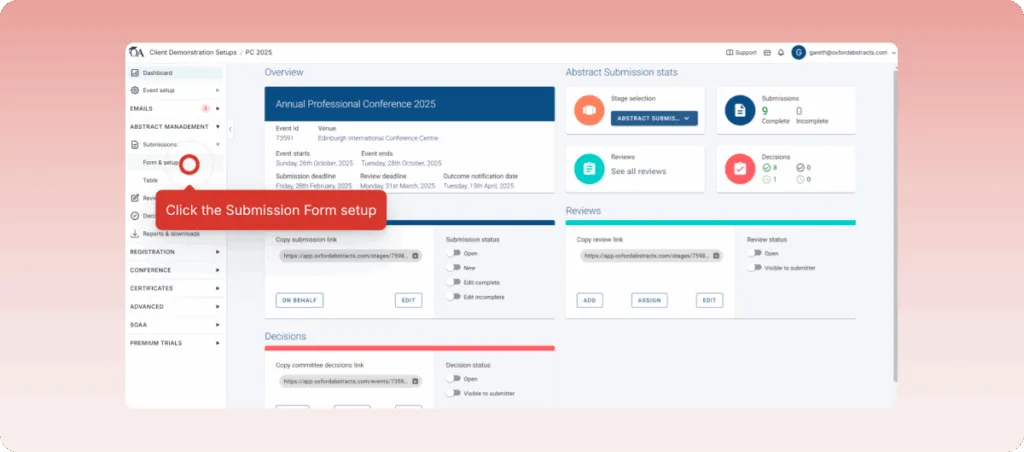
Oxford Abstracts is a user-friendly platform designed for academic conferences. It simplifies the abstract submission and review process, offering tools for managing submissions, reviews, and decisions. The platform supports simple events and conferences, but larger teams may outgrow its reporting, branding, and event management depth.
Key features
- Customizable submission forms: Tailor forms to collect specific information from authors.
- Auto-save for reviewers: Reviewers can pause and resume their work without losing progress.
- Instant abstract books: Generate formatted abstract books quickly.
- Dynamic submission changes: Make real-time updates to submissions without requiring resubmission.
- Auto-assign reviewers: Assign reviews based on categories, streamlining the process.
- Integrated ticketing: Manage event ticketing with options for discounts and add-ons.
Pricing
Oxford Abstracts offers transparent pricing:
- Basic: Free for small meetings with fewer than 25 submissions.
- Abstract Management: $890 per event, including all features of the Basic plan.
- Standard Conference plan: $2,290 per event, adding features like a program builder.
- Professional Conference plan: $3450/per event, including everything on the Standard Conference plan and certificates with a website builder.
Pros
- User-friendly interface: Easy to navigate, reducing the learning curve.
- Transparent pricing: Clear cost structure aids in budgeting.
- Responsive support: Prompt assistance from the support team.
- Customizable forms: Adapt submission forms to event needs.
- Integrated ticketing: Simplifies event registration and payment processes.
- Auto-save feature: Prevents data loss during review processes.
Cons
- Limited customization: Some users find customization options restrictive.
- Basic reporting tools: Advanced reporting features are limited.
6. Dryfta
Best for: Universities, research conferences, and nonprofits managing abstract workflows with registration and scheduling
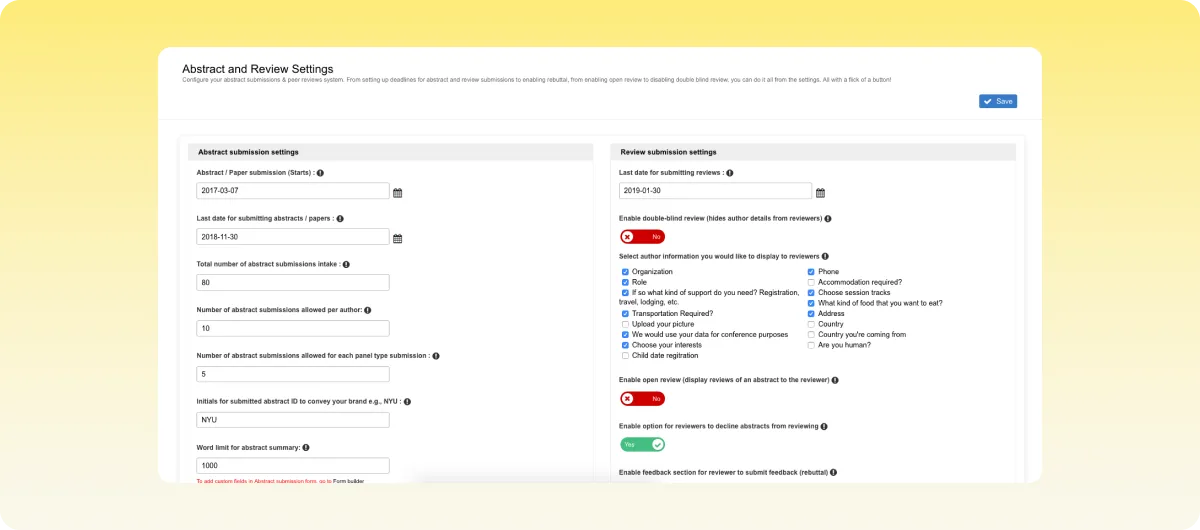
Dryfta serves as an all-in-one event platform with a strong focus on abstract and peer-review workflows. It supports submission, review, scheduling, and engagement from one dashboard. Organizers at universities, non-profits, and research events often turn to Dryfta for its combined capabilities. However, setup can take more effort for complex event configurations.
Key features
- Customizable submission forms: Build entry forms per submission type with tailored fields.
- Automated and manual assignments: Assign submissions by topic or manually via bulk tools.
- Multi-stage review workflows: Support single-, double- and triple-blind evaluations.
- Abstract book publishing: Generate formatted abstracts in PDF or CSV for publication.
- Conversion to schedule: Move accepted abstracts into the event agenda seamlessly.
Pricing
Dryfta lists a Small plan starting at $1,499/year for up to 100 submissions. For mid-sized and large events, pricing is available on request.
Pros
- Intuitive dashboard: Allows authors and reviewers to self-manage submissions.
- Strong author workflow: Supports multi-file uploads and panel submissions.
- Rich review controls: Offers detailed scoring and discussion tools.
- Full integration: Handles abstracts, scheduling, registration and app features.
- Transparent entry-level pricing: Starting cost is public and clear.
- CSV/ PDF export: Facilitates external reporting and archives.
Cons
- Learning curve: Some users say setup takes longer than expected.
- Add-on costs: Some modules (e.g., app branding or on-premise hosting) incur extra fees.
7. X-CD Technologies
Best for: Academic and medical societies handling high-volume submissions and multi-round peer review
X-CD Technologies offers a comprehensive module for abstract management within its full conference platform. It supports submission, peer review, scheduling, and integrates with mobile apps and virtual components. The system is built to scale for both academic and association events, but its depth can make onboarding challenging for leaner teams.
Key features
- Custom forms with conditional logic: Allows organizers to build submission forms that change based on input.
- Multi-level peer review module: Supports numerous review rounds, blind or non-blind, and tracks conflicts of interest.
- Drag-and-drop program builder: Enables quick scheduling of accepted abstracts into sessions and tracks.
- Seamless integration across modules: Abstracts, registration, mobile app, and virtual/hybrid event features all work together.
- Large-event scalability: The platform handles tens of thousands of submissions and scheduled sessions without performance loss.
- Robust reporting and export tools: Hundreds of pre-built reports, with customizable exports into CSV/PDF as needed.
Pricing
Detailed pricing is not publicly listed. X-CD offers a product demo where pricing is tailored to the number of submissions, attendees, and modules required.
Pros
- Flexible submission logic: Handles complex workflows without custom code.
- Deep peer-review control: Tracks conflicts, reviewer load, and rounds.
- Unified event system: Abstracts + registration + mobile app in one platform.
- High-scale performance: Processes tens of thousands of submissions smoothly.
- Mature & proven: Over 25 years of experience in academic conferences.
- One-vendor solution: Reduces need for multiple tools and integrations.
Cons
- Setup time: Complex features may require longer configuration than simpler tools.
- Price on request: Lack of published pricing may slow evaluation for smaller events.
8. Ex Ordo
Best for: Academic and scientific conferences with structured peer review and connected event programming
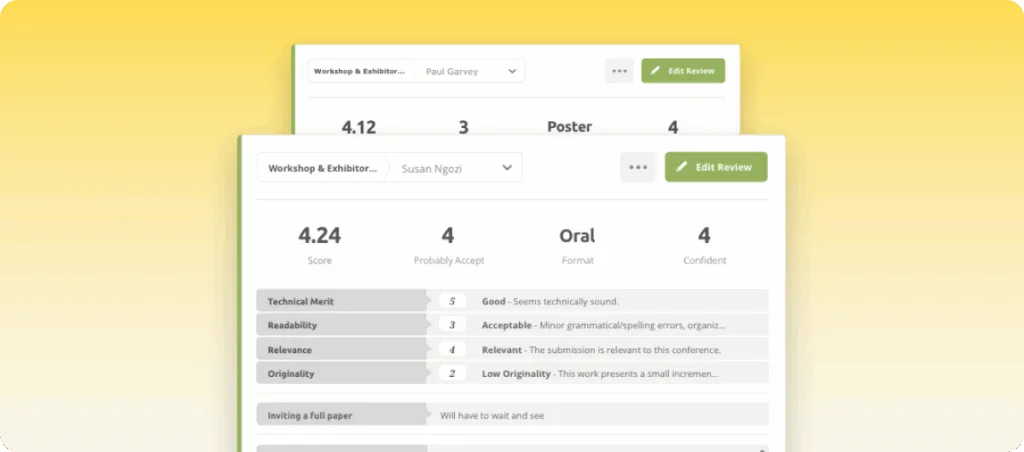
Ex Ordo serves as a connected platform for managing abstract submissions, peer review, and full event programming. It supports academic, technical, and scientific gatherings with tools for abstracts, registration, scheduling, and virtual content. While a great choice for academic reviews, it requires significantly more time to set up.
Key features
- Custom submission forms: Let organizers collect abstracts, papers or panels with flexible fields.
- Allocation engine: Assigns submissions to reviewers based on expertise and availability.
- Review-progress tracking: Monitor which reviewers have started, are pending or finished tasks.
- Dashboard notifications: Send acceptance or rejection letters directly from the platform.
- Integrated registration and virtual event space: Manage delegates, payments and online sessions in the same system.
- Exportable data and reports: Download submission and review data for external use.
Pricing
Ex Ordo does not publish fixed pricing. The vendor requests you contact them for a quote based on your event size, module needs and submission volume.
Pros
- Comprehensive review workflows: Suits single- and multi-round reviews for complex events.
- Integrated event toolset: Combines abstracts, registration and virtual sessions in one platform.
- Strong academic focus: Tailored for scholarly and research-based conferences.
- Reviewer-friendly interface: Reviewers get clear prompts and status updates.
- On-demand content support: Hosts live and recorded sessions alongside abstracts.
- Respectable brand track record: Trusted by professional societies in over 60 countries.
Cons
- Price on request: No transparent pricing may slow decision-making for smaller events.
- Setup complexity: Custom workflows may require more setup time than simpler tools.
9. EasyChair
Best for: Academic and research conferences focused on paper submission and reviewer management
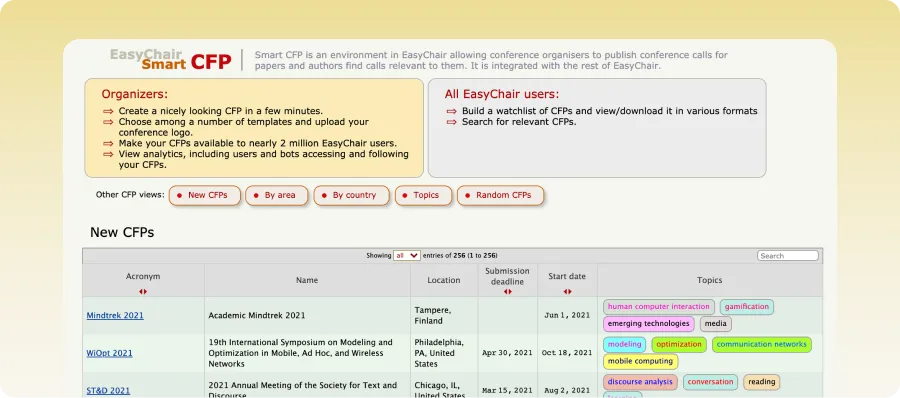
EasyChair is a conference and abstract management platform known for its straightforward workflow. It works particularly well for organizers who need a single system for reviewer assignments, scoring, and communication. However, its interface and branding options may feel limited for modern events.
Key features
- Abstract and paper submission: Collect and organize abstracts, papers, and supporting documents from authors in one system.
- Peer review management: Assign reviewers, track scores, manage feedback, and streamline approval workflows.
- Seamless proceedings publication: Collect, prepare, and publish conference proceedings across various areas of science.
- Role-based access controls: Set permissions for organizers, reviewers, authors, and committee members.
- Automated communication tools: Send notifications, reminders, acceptance letters, and updates directly through the platform.
- Conference program management: Build schedules and organize accepted papers into sessions and tracks.
Pricing
EasyChair uses a submission-based pricing model.
- Free Plan: On a pay-as-you-go basis with a maximum of 20 submissions.
- Professional License: Starts around $4 per submission with a maximum of 60 submissions.
- Executive License: Starts around $5.95 per submission.
- Others: Enterprise and VIP support plans are available for larger conferences.
Pros
- Straightforward interface: Easy-to-manage academic review workflows.
- Comprehensive features: Strong reviewer assignment and scoring tools with centralized management.
- Scalable: Supports large academic conference submissions.
- Research-oriented: Perfect for scientific and research events.
- Flexible pricing: Scalable model allows for effective budget management.
Cons
- Outdated interface: Dashboard design is outdated compared to competitors.
- Customization limits: Branded events would require more customization than it offers.
10. Fourwaves
Best for: Scientific conferences and symposiums, managing abstract submission, registration, and scheduling
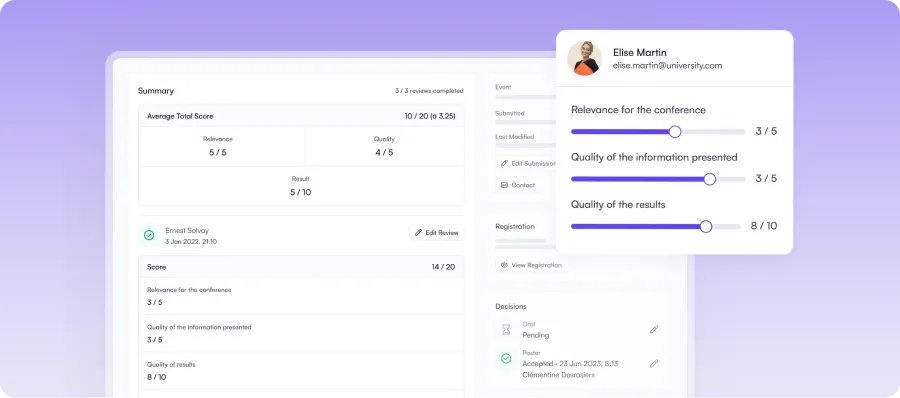
Fourwaves combines abstract submission and conference management into one system. It supports various event formats and is popular for its modern interface, making it one of the best abstract management tools for scientific conferences. While it works well for symposiums, its limited integration options can be a challenge for large events.
Key features
- Abstract submission management: Collect abstracts and supporting documents through customizable submission forms.
- Peer review workflows: Assign reviewers, track scores, and simplify evaluation processes.
- Conference websites: Build websites with schedules, speaker details, and registration data directly on the platform.
- Registration & scheduling tools: Manage registration, session planning, and event scheduling from one dashboard.
- Logistics & communication management: Send automated email reminders, generate attendee name tags, and maintain consistent communication throughout your event.
- Analytics & reporting: Track submissions, collect event surveys, monitor attendee registration, and measure event performance through built-in reporting tools.
Pricing
Fourwaves uses a conference-based pricing model. However, running multiple active events is available on request.
- Free Plan: Available with limited features for smaller events.
- Essential Plan: Starts around $899 per year for one active event.
- Advanced Plan: Starts around $1,799 per year for one active event.
- Pro Plan: Starts around $4,799 per year for one active event.
Pros
- Modern interface: Cleaner and more intuitive than many competitors.
- All-in-one platform: Combines submissions, registration, and scheduling tools.
- Research-focused: Built specifically for scientific and academic conferences.
- Collaborative workflows: Simplifies reviewer and organizer coordination.
- Flexible event management: Supports virtual, hybrid, and in-person events.
Cons
- Premium pricing: Advanced plans may be expensive for smaller events.
- Smaller ecosystem: Fewer third-party integrations than larger competitors.
11. Attendee Interactive
Best for: Medical, accredited, and education-focused events with complex reviewer workflows
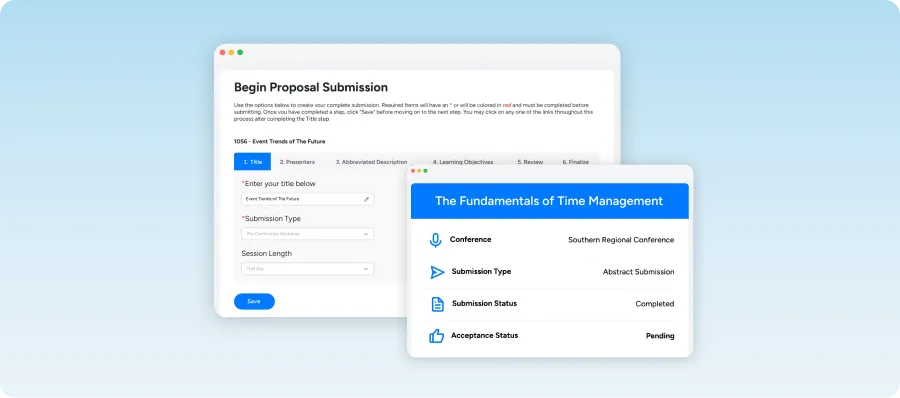
Attendee Interactive supports abstract management, letting you manage speaker data, peer reviews, and accreditation across different event formats. While it serves as a centralized, end-to-end platform, its interface and pricing transparency may be a hurdle for modern teams.
Key features
- Abstract management: Collect and organize abstracts, papers, and speaker submissions in one place.
- Peer review tools: Assign reviewers, track scores, and manage approvals easily.
- Speaker management: Store speaker profiles, session details, and presentation materials.
- Accreditation support: Manage CME, CE, and other accreditation requirements.
- Attendee directories: Give your attendees access to searchable profiles so they can connect with others with similar interests.
- Reporting & analytics: Generate reports on submissions, reviews, attendance, and speaker activity.
Pricing
Attendee Interactive requires organizations to contact the company for a tailored quote and demo.
Pros
- Strong review workflows: Handles complex scoring and approvals well.
- Medical event support: Good for accredited conferences and CME events.
- Centralized system: Keeps submissions and speaker data organized.
- Detailed reporting: Provides useful review and event insights.
- Reliable support: Offers onboarding and customer assistance.
Cons
- No public pricing: Costs are not clearly listed online.
- Older interface: Dashboard design feels less modern.
How to choose the best abstract management system
Before selecting the right abstract management software, it’s advisable to understand how your conference actually manages submissions, reviews, speakers, and final programming. Follow the guide below to make the best decision for your specific needs:
1. Choose based on your event type
The abstract submission management system you choose largely depends on the kind of event you’re hosting. For instance, a small workshop needs fewer tools than a large conference. Also, academic events may need peer reviews and paper scoring. So be sure to pick software that fits the size and structure of your event.
2. Evaluate reviewer workflow features
Before making a decision, check how reviewers receive abstracts and submit feedback. This also involves looking for tools that support blind reviews, scoring, and approvals. The right tool should have a workflow that’s simple for both reviewers and organizers.
3. Check integration capabilities
If your team already uses other tools, your software should connect with them easily. So, look out for integrations with registration systems, email tools, CRMs, and event platforms. Strong integrations reduce manual data transfers and keep registration, review, and scheduling data aligned.
4. Assess ease of use
The abstract management system you choose should feel easy to use. This means organizers, authors, attendees, and speakers shouldn’t struggle with check-in, setup, or navigation. To ensure simplicity, test the dashboard before choosing a platform. This saves time and reduces mistakes during the event process.
5. Compare pricing
If you have a budget in mind, the ideal platform should fit into it. However, beyond just the starting price, you need to compare what each pricing plan actually includes. So, check for limits on submissions, reviewers, support, integrations, or event analytics to avoid unexpected costs later.
6. Review data security standards
Abstracts often contain private research data that requires strong security. To ensure this, look for features like secure logins, encrypted storage, and role-based access. In addition, check if the platform follows data protection rules to help protect research and prevent unauthorized access.
Host standout events with EventsAir’s abstract management features
Hosting an event is daunting enough, but when abstracts, research, and presentations come into the picture, you need an all-in-one system built to handle that complexity end to end. This is exactly what we offer at EventsAir.
With its customizable workflows, seamless integrations, and advanced reporting capabilities, our platform stands out as a reliable all-in-one tool for abstract management. EventsAir is designed to help you save time, reduce errors and manual workload, and improve your audience’s experience.
So, if you’re ready to switch to seamless abstract management, contact us to get started today!
See EventsAir in action
Discover why 12,000+ event professionals trust EventsAir to deliver effortless events, every time.





Ready to transform event chaos into clarity?
With EventsAir, you’ll move from chasing logistics to creating unforgettable moments. Plan faster, act with confidence, and deliver exceptional events. Discover what’s possible with a personalized demo today.