

May AirWaves 2026 – Key Takeways

May's AirWaves delivered one of the most AI-focused sessions yet. Hosted by CMO Kelly Harvey, the webinar brought together CTO Mehdi Khalili, VP of Product Renee Elliott, and CEO Paul Trappett to walk through EventsAir's evolving AI strategy, the latest feature releases, and a look ahead to AirTime 2026.
If you missed the live session, here's everything you need to know.
EventsAir's approach to AI – Mehdi Khalili
CTO Mehdi Khalili opened the session by setting the context for how EventsAir thinks about artificial intelligence and what it deliberately avoids.
AI that solves real problems, not AI for AI's sake
With so much pressure in the SaaS industry to ship AI features, EventsAir has taken a different stance. Rather than building AI capabilities for the sake of having them, every feature within the Air Intelligence suite is grounded in research into the real-world challenges facing event planners.
“Everything that we do internally using AI at EventsAir and within the product has to be AI that solves a real problem.” — Mehdi Khalili, CTO
That research surfaced three core pain points that now shape the entire AI roadmap.
Staff shortages are putting pressure on planners who are expected to do more with less. Features like Content Assistant and Planner Assistant are designed to extend planner capacity, helping teams produce high-quality work without needing to grow headcount.
Budget constraints combined with rising ROI expectations are creating a squeeze that many planners are familiar with. AI use cases within Planner Assistant are being built specifically to help planners generate more revenue – for example, by analyzing historical registration trends to identify the best timing for marketing campaigns and communications.
Attendee expectations around personalization are growing. With hundreds of sessions and thousands of attendees at larger events, the experience of feeling lost or overwhelmed is real. Attendee Assistant is designed to address this directly by delivering personalized session and networking recommendations based on each attendee's profile and interests.
Security and privacy: built in, not bolted on
One of the biggest barriers to AI adoption among event planners, according to EventsAir's research, is concern around data security. Mehdi was clear that this is a legitimate concern and one that EventsAir takes seriously.
“I don't expect event planners to be security specialists or AI engineers to be able to wrangle AI. We've taken all of that into account and embedded AI into EventsAir, taking into account security, governance, and privacy.” — Mehdi Khalili, CTO
Rather than asking planners to use external AI tools independently, EventsAir has embedded AI directly into the platform with those controls built in from the ground up.
Air Intelligence in depth – Renee Elliott
VP of Product Renee Elliott followed with a detailed walkthrough of the three AI assistants currently live or in development within the Air Intelligence suite.
Content Assistant
Content Assistant has been available for some time, and it continues to be one of the most widely used AI features on the platform. Available wherever there is an HTML block within EventsAir, it helps planners create and refine copy for emails, interactive sites, and more.
A key feature highlighted in this session: planners can also configure their own brand tone and style guidelines directly within the platform's AI Settings panel.
“Every time you use Content Assistant it will be following your own brand and your own tone and style, so you're not having to constantly correct it.” — Renee Elliott, VP of Product
The tool also supports a range of editing actions such as summarizing, expanding, adjusting tone (more professional, more casual, more direct, etc.), translating content into other languages, and generating copy based on best practices. Pre-built email templates for common communications like registration invitations and confirmation emails are also built in and ready to use.
Attendee Assistant
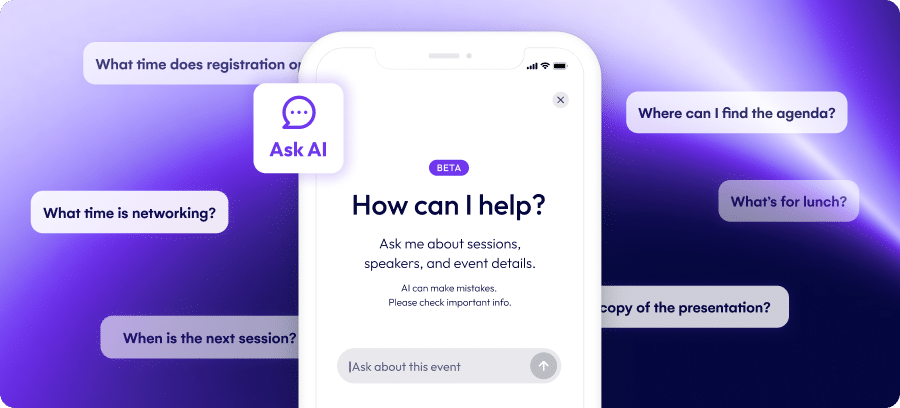
Attendee Assistant lives inside the EventsAir Attendee App and gives attendees a natural language interface to get answers to their questions in real time.
Whether an event has 50 or 5,000 attendees, there will always be questions about the agenda, speakers, sponsors, logistics, and more. Attendee Assistant can answer all of these, as long as the relevant information has been published within the app. Common queries like Wi-Fi details, session locations, and speaker schedules are all within scope.
Planners also retain control over the assistant's voice and parameters, ensuring its responses feel appropriate to the event.
What's coming next for Attendee Assistant: The team is currently developing further personalization capabilities such as the ability for attendees to ask who they should meet, with the assistant reasoning across attendee profiles to make relevant, tailored recommendations. Alongside this, EventsAir is building planner-facing dashboards that will surface insights into what attendees are asking the assistant, including which topics are most common and which questions it currently can't answer, so planners can fill those content gaps.
Planner Assistant
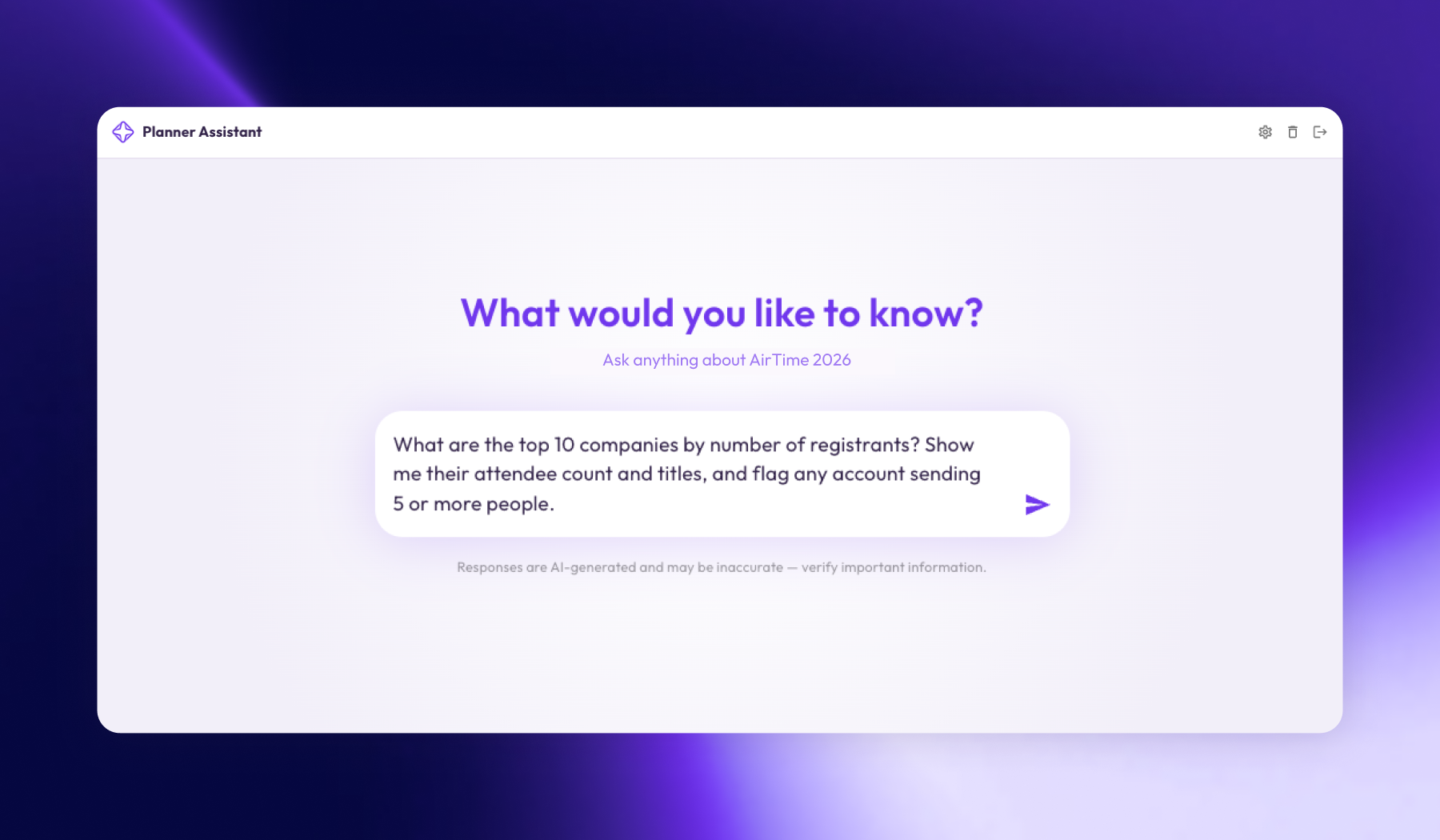
Planner Assistant is the most powerful addition to the Air Intelligence suite and arguably the one generating the most excitement. It will live directly inside EventsAir, accessible from the moment a planner logs in.
Designed to help planners with day-to-day analytical tasks, Planner Assistant can answer questions about live events – registration volumes, revenue trends, function data, survey results – and chart that information visually for easy review. It can also compare current event performance against historical data, making it straightforward to track year-on-year progress.
What makes it particularly valuable is the quality of its recommendations. Because it has full context across all events within a planner's instance, its insights are specific to that planner's data. In testing, the tool identified optimal days of the week to send registration communications (Tuesdays and Thursdays, in one example) based purely on real patterns in that event's registration history.
Planner Assistant is currently in active development. The team is focused on testing accuracy before launch, and will communicate timing to customers as soon as it's ready.
Want to go deeper? Event Tech Live's Adam Parry recently got an under-the-hood look at how Air Intelligence works and what's coming next. Read the full article here.
Event Setup Assistant
Also covered in this session was the Event Setup Assistant. A guided, step-by-step experience designed to help new users get an event live quickly.
Walking planners through three phases (creating the event, configuring the setup, and building the registration form), the assistant eliminates the guesswork from initial setup. It prompts users to complete the right steps in the right order – including setting up tax before registration types, for example – and provides detailed guidance on confirmation emails, payments, and branding.
Interactive Sites update
Renee also provided an update on the latest changes to Interactive Sites modern theme. Development has continued since the beta launched, with the next release bringing improvements to accommodation and travel within interactive sites specifically.
Beyond the visual upgrade, significant accessibility work has also been completed, including support for screen readers and keyboard navigation throughout the full registration journey.
EventsAir Pay update – Paul Trappett
CEO Paul Trappett joined to share a practical update on EventsAir Pay, the platform's native payment processor.
Flexible surcharging
Different credit cards – domestic and international – carry different processing fees. Previously, customers applying a blanket surcharge were inadvertently overcharging some attendees and undercharging others.
EventsAir has now introduced flexible surcharging, available exclusively through EventsAir Pay powered by Stripe. Because the platform can identify the specific card type being used at the point of payment, surcharges can now be applied at the card level. This ensures customers are charged an amount that more accurately reflects the actual processing cost.
AirTime 2026: Registration opening soon
The session closed with an important update on AirTime 2026, EventsAir's flagship customer conference.
Registration opens for previous attendees on 1 June, and to the broader EventsAir community on 15 June. Early registrants will have access to the best available pricing, so keep an eye on your inbox.
Here's where we're heading:
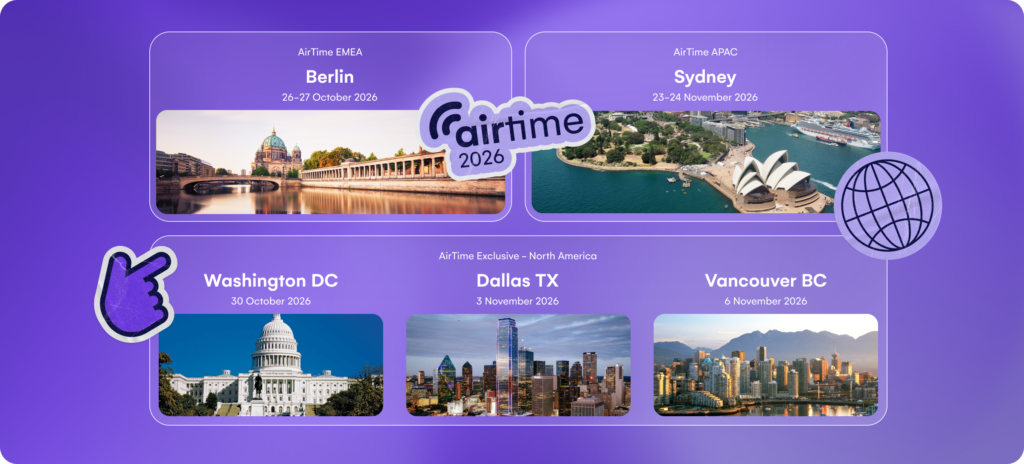
- AirTime Sydney: Sunday, November 22 – Tuesday, November 24
- AirTime Berlin: Sunday, October 25 – Tuesday, October 27
- AirTime North America: Washington DC (October 30), Dallas TX(November 3), Vancouver BC (November 6)
For those thinking of attending for the first time, the message was clear: AirTime isn't just about the technology. It's about the connections you make with a community of experienced event professionals, and that opportunity is valuable regardless of how long you've been using the platform.
Missed the session?
You can catch up on the full AirWaves webinar to see these updates in action and hear directly from the team. Reach out to your Account Manager to access the full recording.
See EventsAir in action
Discover why 12,000+ event professionals trust EventsAir to deliver effortless events, every time.


Ready to transform event chaos into clarity?
With EventsAir, you’ll move from chasing logistics to creating unforgettable moments. Plan faster, act with confidence, and deliver exceptional events. Discover what’s possible with a personalized demo today.