

12 Event Management Automations That Save You Time


If you've ever spent an afternoon chasing outstanding payments, updating catering numbers or sending the same reminder for the tenth time, you'll know how quickly event admin adds up.
These tasks are important. But do they all need your personal attention? Not necessarily.
Event management automation helps you take care of repetitive tasks without having to manage every step yourself. From registration confirmations to on-site check-in and post-event follow-ups, the right workflows can save valuable time while keeping your event running smoothly.
And the best part? You don't have to automate everything at once.
In this guide, we'll explore 12 practical event management automations you can use before, during and after your event, with examples of how they work in practice.
Quick reference: 12 event automations at a glance
Not sure where to start? Here's a quick overview of the workflows we'll cover.
What is event management automation?
Event management automation is the use of software to complete repetitive event tasks based on a schedule, action or set of conditions.
For example, when someone registers for your conference, your event management platform can automatically send their confirmation email. If they haven't paid, it can send a reminder. And when they arrive, their check-in can update your attendance records without anyone having to enter the information again.
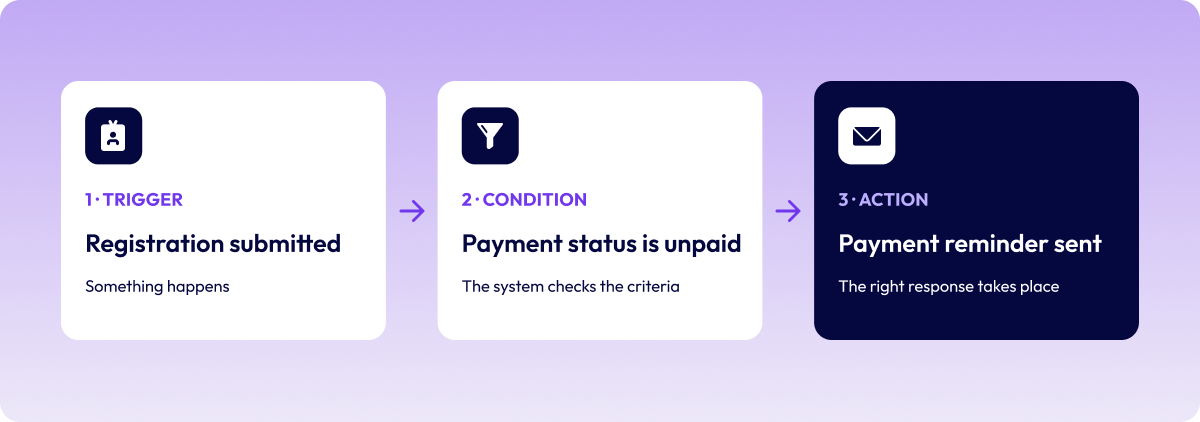
Most event automation workflows involve three elements:
- A trigger: Something happens, such as a registration being submitted or a payment becoming overdue.
- A condition: The system checks whether certain criteria apply, such as the attendee's registration type or payment status.
- An action: The appropriate response takes place, such as sending an email, updating a record or notifying a team member.
Of course, not every automation needs all three. Some are as simple as scheduling a message to send on a particular date.
The real value comes when your event tools work together. With a connected event management platform like EventsAir, registration, communications, payments and reporting can draw on the same attendee information. That means less time moving data between systems and fewer opportunities for mistakes.
Signs it's time to automate your event workflows
Some event teams have been using manual processes for so long that they barely notice how much time they take.
Sound familiar?
Perhaps you're exporting registration lists every morning, checking who still needs to pay or updating a spreadsheet whenever someone changes their dietary requirements.
A few signs that automation could make a difference include:
- Your team spends hours on repetitive admin. Sending confirmations, chasing payments and updating attendee records takes time away from more important work.
- You're working across several spreadsheets or platforms. Information needs to be copied, checked and reconciled more often than it should.
- Small details keep getting missed. An overdue payment, an outdated headcount or a forgotten follow-up can create unnecessary problems.
- Attendees keep asking the same questions. Your team spends valuable time answering queries that could be handled through event communications or self-service tools.
- Reporting takes longer than expected. Pulling together attendance, engagement and financial data becomes a major task after every event.
If a few of these sound familiar, you probably have some good opportunities to automate.
Let's look at where to start.
Before the event: 6 automations to make planning easier
The weeks leading up to an event can be some of the busiest.
You're promoting the program, managing registrations, coordinating suppliers and keeping everyone informed. And that's before the last-minute changes start coming in.
These six workflows can help you stay on top of the details without adding more to your team's workload.
1. Schedule your event promotions in advance
Keeping event promotion consistent is easier said than done.
You might have speaker announcements to share, early-bird deadlines to promote and registration reminders to send. But when planning gets busy, marketing can quickly slip down the priority list.
Scheduling your promotional communications in advance means your campaign can keep moving, even when your attention is elsewhere.
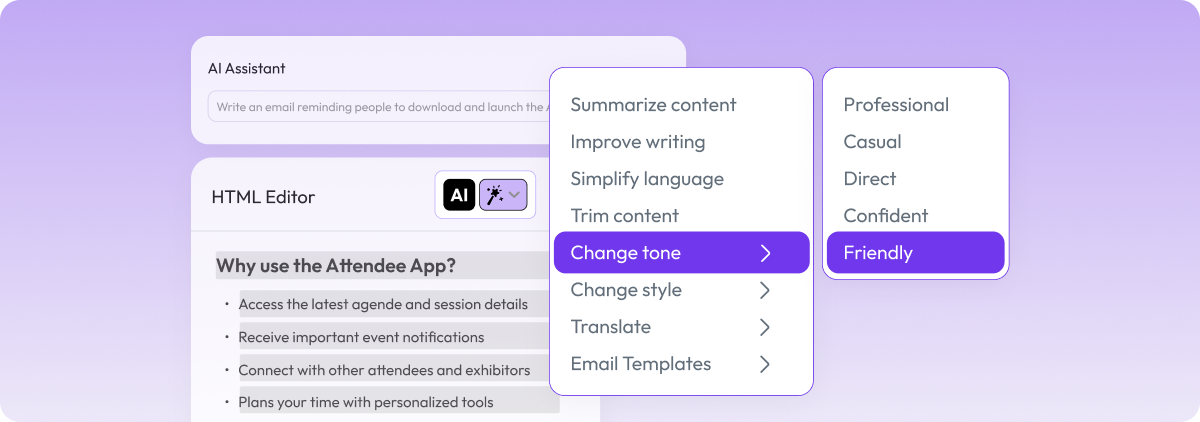
With EventsAir, you can prepare promotional emails, event website updates and app notifications ahead of time. The Content Assistant can also help draft messages in your brand voice, giving your team a starting point to review and refine.
If you use a CRM or member management system, integrations with platforms such as HubSpot, Salesforce and iMIS can help you coordinate your outreach using existing contact information.
Here's an example.
You're organizing a conference with ten speakers to announce over the next two months.
Rather than drafting and sending every announcement individually, you prepare a series of emails, review the content and schedule them across your campaign.
Your speakers receive regular promotion, potential attendees have new reasons to visit the registration page, and your team doesn't have to remember another weekly task.
It's a relatively simple automation, but one that can make your marketing much easier to manage.
2. Make registration and ticketing easier for everyone
Registration is often one of the first places event planners look to automate. And for good reason.
Even a straightforward event can have several attendee types, ticket prices and registration requirements.
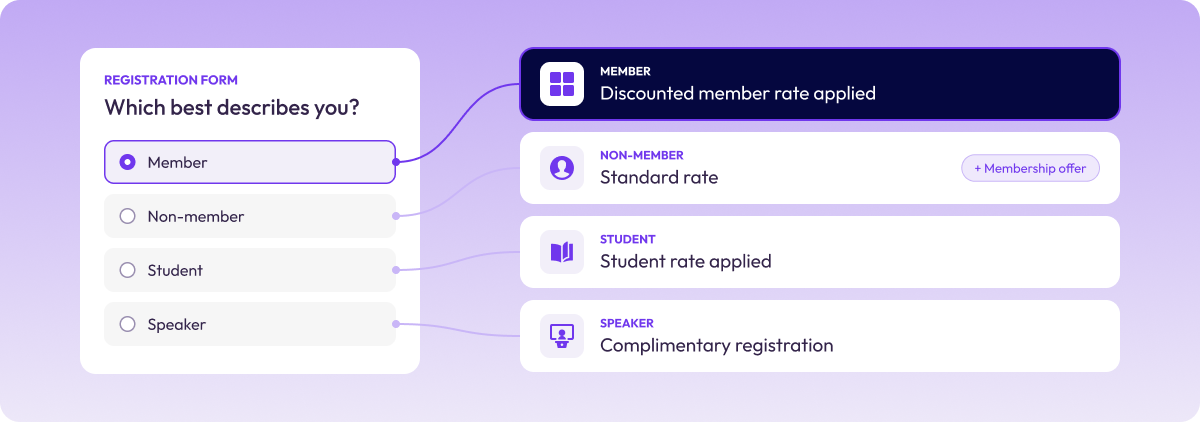
For an association conference, for example, you might need different rates for members, non-members and students. Speakers may receive complimentary registration, while sponsors need access to specific packages.
Managing all those variations manually is a lot of work.
With conditional registration forms, attendees can be guided through the questions and options relevant to them. The system can apply the appropriate ticket type, pricing and confirmation based on their selections.
EventsAir also offers tools to support more complex registration needs, including:
- Promotional and discount codes
- Group registrations and waitlists
- Attendee Verification, which checks details against an external database
- Registration Recovery, which helps attendees return to incomplete registrations
Why does this matter?
For attendees, it means a more straightforward registration experience.
For your team, it means less manual checking, fewer corrections and registration data that's ready to use elsewhere in your event planning.
Imagine an association congress where members automatically receive their discounted rate, speakers follow a complimentary registration path and non-members can see a membership offer alongside their ticket options.
All those registration types can be handled through one process, without your team manually reviewing every submission.
3. Set up attendee communications once
How many emails does your team send between registration opening and event day?
There's the initial confirmation, payment information, venue details, travel advice, program updates and those all-important reminders.
Now multiply that by hundreds or thousands of attendees.
Fortunately, most of these messages can be prepared well in advance.
Automated attendee communications let you schedule messages and tailor them to different groups using information already held in your event platform.
In EventsAir, dynamic filters can help you target communications based on factors such as registration type, payment status or attendee activity.
For example, you might send:
- First-time attendees practical advice on what to expect
- VIPs information about exclusive networking opportunities
- Speakers reminders about presentation requirements
- Unpaid registrants a link to complete their payment
And because filters can reflect changes in attendee status, you don't need to keep rebuilding your lists manually.
Consider a conference with several registration tiers.
Your general attendees might receive program highlights and tips for planning their day, while VIPs receive additional information about networking functions. If someone cancels their registration, they can be excluded from future attendee communications.
The result is more relevant messaging, with far less manual list management.
4. Take the manual work out of payment reminders
Chasing outstanding payments probably isn't anyone's favorite part of event planning.
But unpaid registrations can create problems for budgets, reporting and final attendee numbers, particularly as event day approaches.
Rather than checking balances and sending individual emails, you can automate much of the process.
Using financial filters in EventsAir, you can identify registrations with outstanding balances and schedule reminders to the relevant attendees.
If a payment is still outstanding closer to the event, an alert can notify your team so someone can follow up personally.
This is particularly useful when you're dealing with different payment arrangements.
For example, some attendees may pay immediately by card, while others are waiting for a purchase order to be approved. Your reminder messages can reflect those differences rather than sending everyone the same email.
There's also the reconciliation side to consider.
EventsAir Pay supports payment matching and financial reporting, while Smart Connectors can help synchronize financial information with accounting platforms such as Xero, MYOB, QuickBooks and Sage.
One example comes from Impact Events, which used the Xero Smart Connector to reduce bookkeeping reconciliation from two days a week to two hours.
That's a significant amount of time to get back, especially for teams managing multiple events.
The takeaway: Automate the routine reminders and reconciliation work, then let your team focus on the payments that genuinely need attention.
5. Keep your team informed with automatic notifications
Not every event automation is attendee-facing.
Some of the most useful workflows happen behind the scenes, helping your team respond to registrations, approvals and changes without constantly checking for updates.
EventsAir's alert tools can respond when particular conditions are met.
Depending on the workflow, an alert can:
- Notify a team member
- Add a custom tag to a contact record
- Add a package to a contact record
- Send an email to an attendee
- Send information to an external stakeholder
These options are particularly valuable for events with more complex approval or coordination requirements.
Take a government event with additional security requirements.
Every registration needs approval before the attendee can proceed.
Instead of forwarding registrations manually, you can set up an alert to notify the appropriate reviewer. Once a decision is made, the attendee receives the relevant communication, including payment information if their registration is approved.
You could also use a separate alert to notify your travel team when an approved attendee has requested accommodation or transport.
It doesn't remove the need for human decisions. It simply makes sure the right person receives the right information when they need it.
6. Keep catering numbers and dietary requirements up to date
Catering numbers have a habit of changing right up until the deadline.
Someone cancels. Another attendee adds a guest. A dietary requirement gets updated.
And suddenly the spreadsheet you sent the venue yesterday is already out of date.
Automating catering reports can help reduce that back-and-forth.
In EventsAir, dietary requirements are captured during registration and stored against attendee records. Catering reports can then reflect updated registration information.
You can also share reports with external stakeholders, such as your venue or catering team, without requiring them to have an EventsAir login.
This is especially useful for events involving guests, seated functions or complex dietary requirements.
Of course, it's still important to confirm final numbers and critical allergy information with your caterer.
But having a more reliable source of information makes those conversations much easier.
On the day: 4 automations that help everything run smoothly
Event day is when all that planning comes together.
It's also when you need information quickly. Attendees are arriving, sessions are starting and last-minute changes are almost inevitable.
These automations help your team respond without getting caught up in unnecessary admin.
7. Speed up check-in and badge printing
Nobody wants their first event experience to be a long registration queue.
And for your team, manually searching attendee lists or sorting through pre-printed badges isn't the best use of time either.
Automated check-in gives attendees a faster way to get through the door.
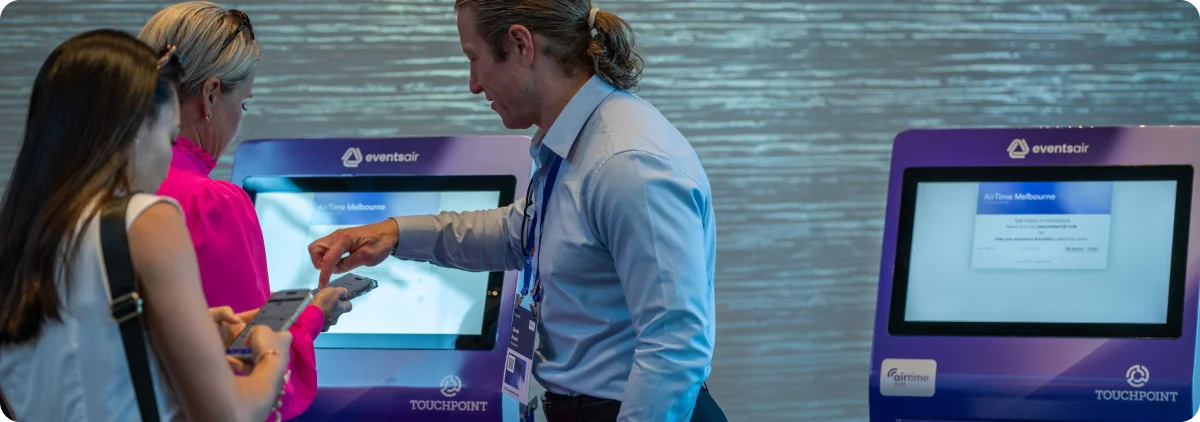
With EventsAir, attendees can scan a QR code at a self-service kiosk or check in at a staffed desk. Their arrival is recorded, and a badge can be printed on demand.
Different badge layouts can also be prepared for different attendee types, such as speakers, exhibitors and delegates.
Meanwhile, staffed check-in stations can help with the exceptions that inevitably come up, including name changes, badge reprints, on-site registrations and payments.
For a multi-day conference, attendees might scan their tickets each morning, giving organizers an updated attendance record without manually marking names off a list.
Your team now has a clearer picture of who's arrived, while staff remain available to help attendees who need extra assistance.
8. Track attendance and session participation automatically
Knowing how many people registered is useful.
Knowing how many actually attended, and which sessions they joined, can be even more valuable.
Session-level attendance tracking lets organizers capture participation through scans rather than relying on manual headcounts.
This can help you understand which sessions attracted the most interest, monitor attendance and maintain more accurate participation records.
For associations, there's another important advantage: continuing professional development (CPD) tracking.
Where applicable, attendance scans can support the allocation of CPD points or credits, helping organizers maintain records of member participation.
Session access controls can also help manage entry to restricted briefings or ticketed workshops.
Here's a practical example.
You're running a conference with several breakout sessions.
Before the event, attendees build their personal agendas in the app, and one workshop is attracting more interest than expected. You move it into a larger room.
On the day, session scans show actual attendance, giving your team a more accurate understanding of participation.
Rather than relying on assumptions or manual counts, you've got information to support decisions during the event and reporting afterwards.
9. Keep your event agenda updated
Even the most carefully planned agenda can change.
A speaker gets delayed. A workshop needs a larger room. A session runs at a different time.
When that happens, the challenge isn't just updating the schedule. It's making sure attendees know about the change.
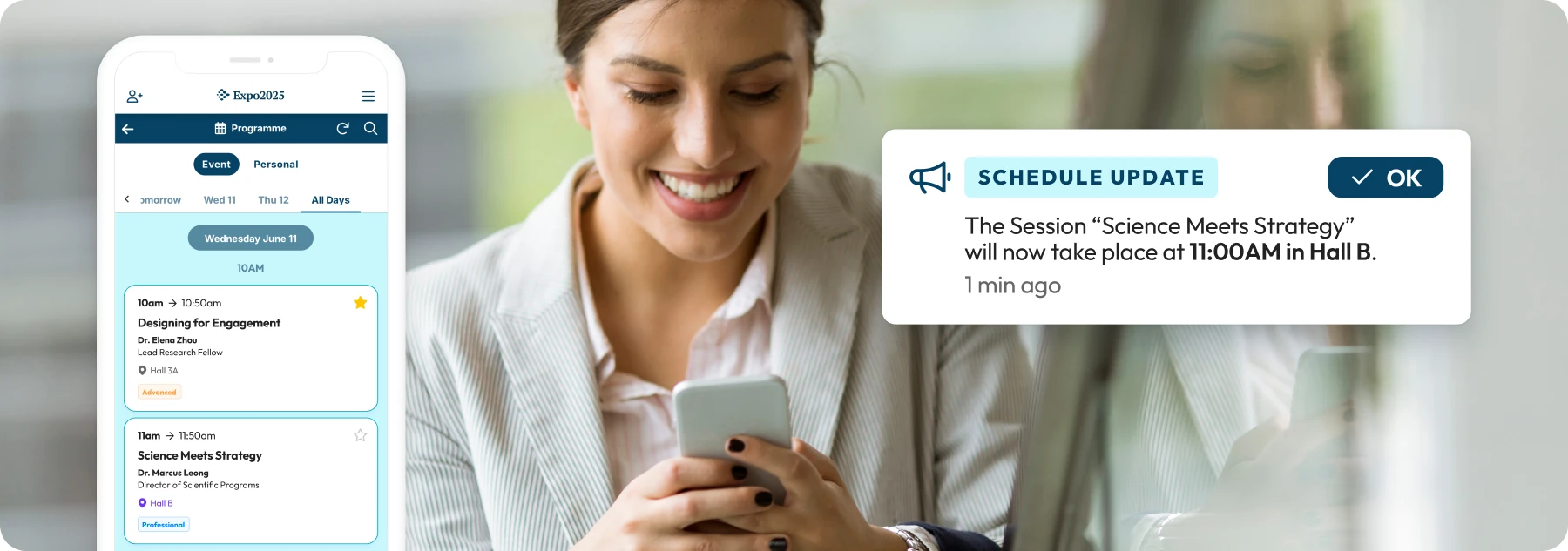
With EventsAir, updates to session, speaker and agenda information can be reflected across your event website and mobile app.
You can also send notifications to alert attendees to important changes.
That means less reliance on printed programs, last-minute announcements or signs taped to meeting room doors.
For example, imagine a speaker needs to be replaced on the morning of their presentation.
Your team updates the speaker and room details in EventsAir, and attendees can see the revised information in the event app. A notification helps draw attention to the change.
There's a sustainability and cost benefit here, too.
At AAAC, delivered by Velocity Vision, mobile app adoption reached 68%, and the event saved more than $8,000 by eliminating printed programs.
It's a useful reminder that better event communications can have benefits well beyond convenience.
10. Answer common attendee questions with an AI assistant
No matter how much information you share before an event, attendees will still have questions.
Where do I collect my badge? What time does the keynote start? Is there a vegetarian lunch option?
These are all reasonable questions. But when hundreds of attendees are asking them, your help desk can get busy very quickly.
An AI-powered attendee assistant can help by making event information easier to access.
EventsAir's Attendee Assistant sits within the event app and draws on information such as your agenda, sessions, speakers, sponsors and exhibitors.
You can also add practical details covering areas such as venue logistics, travel, accommodation and event policies.
Attendees can then ask questions in a conversational way, rather than searching through multiple pages to find an answer.
The assistant can also recommend relevant sessions, sponsors and experiences based on the information available.
Think about the first morning of a large conference.
One attendee wants to know where their workshop is. Another is looking for lunch information. Someone else wants help choosing sessions.
Instead of joining the help desk queue, they can ask the Attendee Assistant.
That leaves your on-site team more time for the situations that need personal attention, such as accessibility support, registration issues or unexpected changes.
It's a good example of where AI can be genuinely useful in event management: taking care of straightforward questions so your people can focus on more complex ones.
After the event: 2 automations worth setting up early
Once the event finishes, it's tempting to move straight on to the next one.
But there's still valuable work to do, particularly when it comes to gathering feedback and maintaining relationships with attendees.
A little preparation before the event can make this stage much easier.
11. Collect feedback while the experience is fresh
We've all received a feedback survey long after an event and struggled to remember the details.
For organizers, that's a missed opportunity.
The closer feedback is collected to the experience, the easier it is for attendees to provide specific, useful responses.
With EventsAir, you can set up session surveys within the event app, so they're available as part of the attendee experience.
Live polling and Q&A tools can also help you gather feedback and audience input during sessions.
For a conference with twelve breakout sessions, for example, you could configure a survey for each session in advance.
Rather than creating and distributing separate survey links after the event, attendees can access the relevant survey in the app.
Your team can then review feedback by session and identify which topics, speakers or formats resonated most.
And because the process is already set up, you can focus on what the feedback tells you instead of spending time collecting it.
12. Make post-event follow-up more personal
A generic thank-you email is better than no follow-up at all.
But when you've collected useful information about attendee interests and participation, you have an opportunity to make your communications more relevant.
Automated post-event follow-ups can use attendee data to help you send different messages to different groups.
For example:
- Attendees from a technical track receive relevant session resources.
- Business-focused attendees receive a different set of presentations.
- Registrants who didn't attend receive a message with access to available recordings.
- Exhibitors can use lead capture tools to send follow-up messages and resources to contacts they've scanned.
These communications can be prepared in advance and scheduled around the end of your event.
Imagine you've just finished a two-day conference.
Instead of manually sorting attendees into different lists, you use the information already captured during registration and the event to help organize your follow-up communications.
Attendees receive content that's more relevant to their interests, and your team doesn't have to build every message from scratch.
It's also a useful starting point for longer-term engagement, particularly for associations and organizations that run recurring events.
For more ideas on what to do with your event data, see our guides to post-event analysis and the event debrief, and explore EventsAir's event analytics.
Where should you start with event management automation?
With so many opportunities to automate, it can be tempting to try everything at once. But you don't need twelve new workflows to start seeing a difference.
Begin with the task that takes up the most repetitive time or creates the most avoidable mistakes.
For many teams, that might be registration confirmations, attendee reminders or payment follow-ups.
Once those processes are running well, look at the next opportunity.
It also helps to think about how your workflows connect.
For example, registration information can support attendee communications, catering reports and check-in. Attendance data can then help with reporting and post-event follow-up.
When those processes use the same event information, you spend less time transferring data and checking for inconsistencies.
That's where an all-in-one event management platform can be particularly valuable.
EventsAir brings tools for registration, communications, payments, check-in, attendee engagement and reporting together, helping planners manage more of the event process in one place.
And while automation can save time, its value goes beyond efficiency.
It can help you reduce avoidable errors, keep attendees informed and give your team more room to focus on delivering a great event.
After all, that's the work your expertise is really needed for.
Ready to see how automation could simplify your next event? Request an EventsAir demo to explore how our connected event management tools can support your team.
Frequently asked questions about event management automation
1. What is event management automation?
Event management automation uses software to complete repetitive event tasks based on schedules, triggers or predefined conditions. Common examples include registration confirmations, payment reminders, attendee communications, check-in and post-event surveys.
It helps event planners reduce manual admin while keeping event information and processes up to date.
2. What event management tasks can be automated?
Many routine event tasks can be automated, including registration and ticketing, promotional emails, attendee reminders, payment follow-ups, team notifications, catering reports, badge printing, attendance tracking, agenda updates, surveys and post-event communications.
The best tasks to automate are usually those that happen frequently and follow a predictable process.
3. How do you automate event management workflows?
Start by identifying a repetitive task and deciding what should trigger it.
For example, you might want an email to send whenever someone completes their registration.
Then decide whether any conditions apply, such as different messages for speakers and general attendees.
Finally, configure the action in your event management platform and test the workflow before using it with real attendees.
4. What's the difference between native event automation and integration tools?
Native event automation works within an event management platform, using information already stored in the system.
Integration tools such as Zapier, Make and Power Automate connect separate applications and help them exchange information or trigger actions.
Both approaches can be useful. The right choice depends on your existing tools, the complexity of your workflows and how much information needs to move between systems.
5. Is event automation useful for smaller events?
Absolutely.
You don't need thousands of attendees to benefit from automated registration confirmations, reminder emails or feedback surveys.
A small workshop may only need a few straightforward workflows, while a large conference might require more complex conditions and attendee segments.
The key is choosing automations that genuinely reduce work for your team.
6. How much time can event automation save?
That depends on the event, your existing processes and how many tasks are currently handled manually.
Teams with repetitive communications, payment follow-ups or frequent data updates may see particularly useful time savings.
A good way to measure the impact is to track how long a task takes before automation, then compare it with the time needed to set up, monitor and maintain the automated process.
7. What should event planners automate first?
Start with a task that's repetitive, time-consuming and relatively straightforward to automate.
Registration confirmations and attendee reminders are often good starting points.
Payment reminders and catering reports can also be valuable, particularly when your team is managing changing information or tight deadlines.
Once you've automated one process successfully, you can build from there.
8. Do you need technical skills to set up event automation?
Not necessarily.
Many modern event management platforms offer tools that let planners configure communications, filters and workflows without writing code.
More complex integrations may require additional setup or technical support, especially when several external systems are involved.
For most teams, the important first step is understanding the process they want to automate and what should happen at each stage.
See EventsAir in action
Discover why 12,000+ event professionals trust EventsAir to deliver effortless events, every time.




Ready to transform event chaos into clarity?
With EventsAir, you’ll move from chasing logistics to creating unforgettable moments. Plan faster, act with confidence, and deliver exceptional events. Discover what’s possible with a personalized demo today.