

Event Wayfinding: Best Practices for Conferences and Trade Shows


Poor event wayfinding is one of the quickest ways to ruin your attendees’ entire experience. When attendees struggle to find sessions, locate exhibitors, or just simply navigate their way around the event floor, they disengage and leave with a weaker impression of the event.
That’s why when you’re planning any large event, good wayfinding should be at the top of your list. In this EventsAir guide, we’ll explain what event wayfinding is, why it matters, and the best practices for getting it right and driving active participation at your next event.
What is event wayfinding?
Event wayfinding is the system of messaging, tools, and signals that helps attendees navigate your event from their arrival to its closing. They could be either physical or digital.
With physical wayfinding, attendees rely on objects around the venue. This often includes banners, directional signs, booth numbers, or printed maps.
Digital wayfinding, on the other hand, delivers the same information using digital tools. Think event apps, interactive floor plans, or live updates that adjust as the event unfolds.
Why does effective event wayfinding matter?
Besides frustrating attendees, poor navigation can cost you session attendance, exhibitor foot traffic, and satisfaction scores that are hard to recover after the event. Here’s why getting it right matters more than most organizers expect:
1. Reduces attendee friction
If your attendees can't easily find where to register, the event already feels harder than it should. Good wayfinding solves this from the moment they arrive. It makes it easier for attendees to move around the event, removing the friction that comes with not knowing where to go and letting them focus on the event experience you’ve built.
Digital wayfinding is especially important here. In a Freeman’s report, 44% of attendees said their most important experience element was technology that made consuming the event easier.
2. Improves session attendance
Mappedin’s venue experience research found that one in four visitors waste time searching for amenities, exits, and other essentials. But at a conference or trade show, sessions start and end on schedule regardless of whether an attendee has found the room.
The direct consequence is, attendees who can’t locate a session quickly enough either arrive late and miss value or end up skipping the session altogether. Clear event wayfinding makes it easier for them to find sessions on time and follow through.
3. Increases exhibitor visibility
Exhibitors pay for lead capture and conversion, and poor navigation drains that investment. Wayfinding tells attendees how to locate exhibitors, giving them a visibility layer that printed programs alone can’t match.
Effective wayfinding also makes life easier for your event team. When attendees can quickly find sessions, exhibitors, and amenities on their own, staff spend less time answering directional questions and more time supporting higher-value tasks. Better crowd flow also helps reduce congestion in busy areas and keeps your event running more smoothly from start to finish.
8 event wayfinding best practices
Good wayfinding is the result of deliberate planning, consistent design decisions, and the right tools working together. Below are eight of the best practices to ensure successful navigation for every attendee:
1. Plan attendee journeys before signage
Before placing signage or creating digital maps, walk through your event as an attendee would. Map their journey from arrival, registration, and check-in. Then trace the paths to session rooms, exhibitor booths, networking areas, restrooms, and exits.
Any point where attendees are most likely to stop, hesitate, or ask for directions needs a wayfinding solution. Prioritize high-traffic moments, such as registration and event check-in or the transition between a keynote and breakout sessions.
Also, consider different attendee types. It’s unlikely that a first-time attendee follows the same route as an exhibitor, speaker, or VIP, and your wayfinding strategy should support all of them.
Getting the journey right before committing to physical installations saves you from expensive last-minute fixes.
2. Design clear, consistent signage
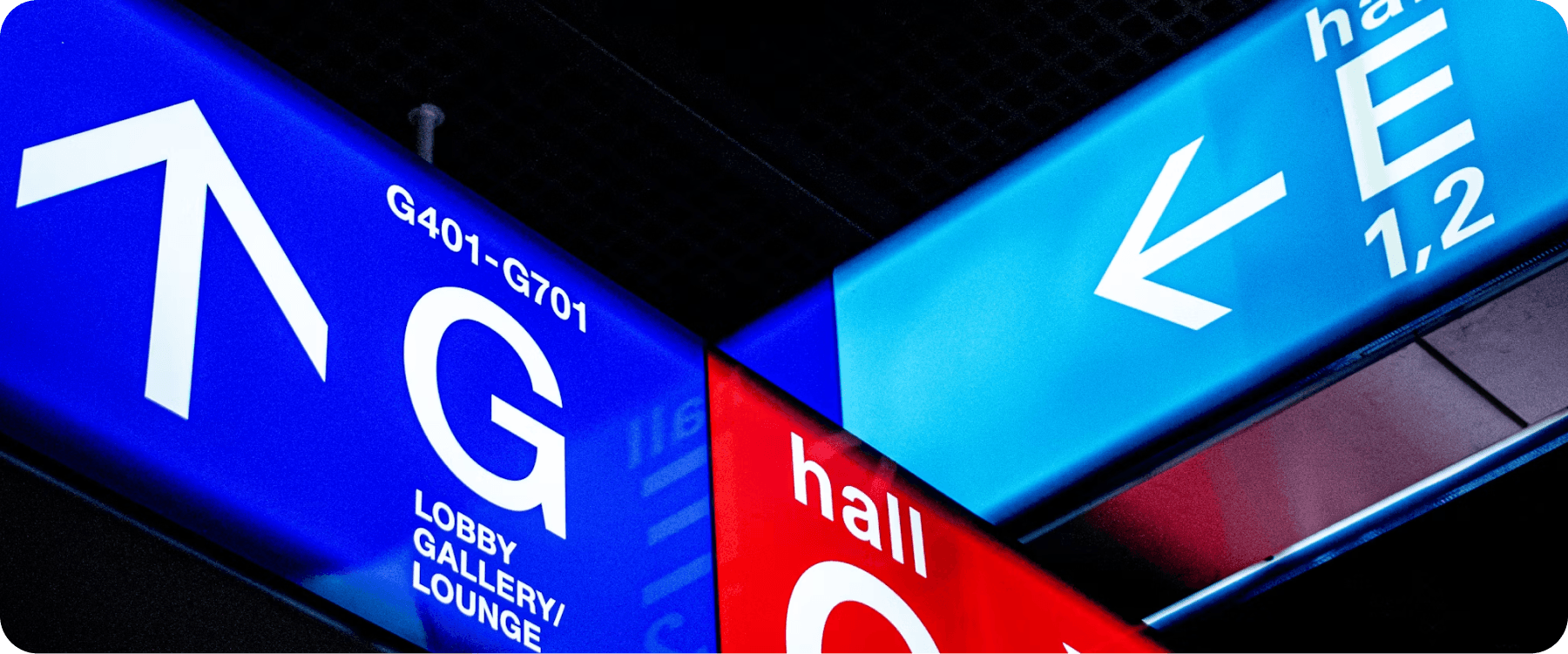
Physical signage is still the backbone of event wayfinding, even as digital tools become more common. Signs need to be planned carefully so they guide every attendee, regardless of when they arrive or which entrance they use.
As you design your signage:
- Use large, high-contrast text that can be read from at least five meters away
- Use one font family and a consistent color system throughout the venue
- Keep messaging short. Show the room name, number, and directional arrow only, leaving explanations in the mobile app or event guide
- Use consistent names for rooms, halls, and event spaces across all channels
- Place directional signs at key decision points, such as entrances, intersections, and elevators
- Use floor-level signage for large venues where overhead signs compete with banners and displays
The goal is to make every sign readable at a glance, from a distance, and under your specific event lighting conditions. It’s also important to repeat signage at various strategic points instead of sticking to one route only.
3. Provide digital event navigation tools
Physical signage tells attendees where to go, but digital tools help them plan, adapt, and explore without relying on staff. When schedules change, exhibitors move, or sessions fill up, digital navigation keeps your wayfinding system responsive and up to date.
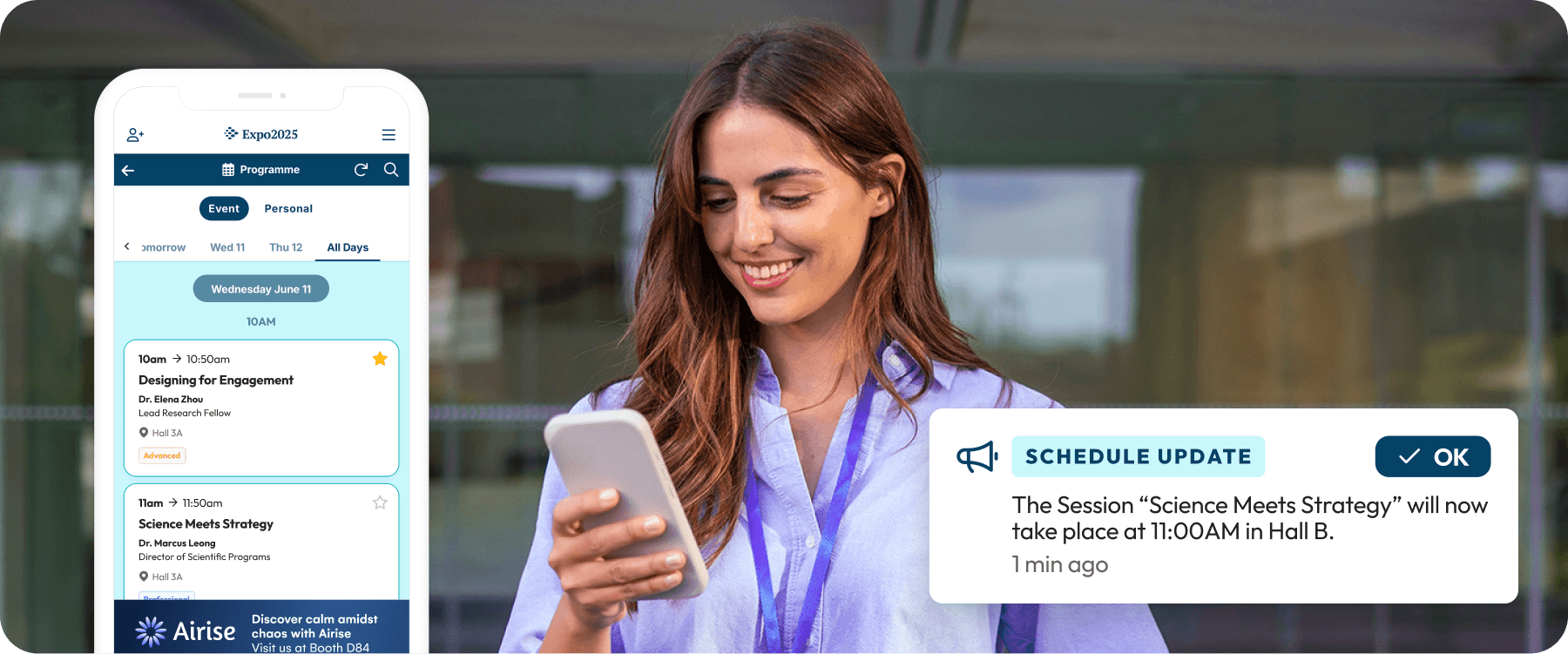
Ideally, digital navigation should include an interactive floor map, a searchable exhibitor and session directory, and push notifications for sudden changes. Mobile event apps put all this together in a single, easily accessible solution for attendees.
Tip: Attendees shouldn't need to check multiple sources to navigate an event. EventsAir’s mobile event app offers maps, personalized schedules, exhibitor directories, and live event updates in one place, so they can navigate the whole event from a single screen.
4. Guide attendee journeys with personalized agendas
Personalized agendas help attendees understand where they need to be next and when. With access to these ready-built, tailored agendas, attendees can arrive prepared with a plan rather than skimming programs onsite. It also reduces the chances of missed sessions or unnecessary backtracking across the venue.
Agendas should include session details, room locations, links to maps, and automatic updates when schedules change. For instance, EventsAir’s personalized agendas, that are integrated directly into our Attendee App, ensure that attendees can move from one session to the next with the latest information always at hand.
5. Help attendees locate exhibitors and sponsors
For many attendees, the exhibition floor is one of the biggest reasons for attending. But if they can’t find the exhibitors or sponsors they’re interested in, they won’t visit, and exhibitors who don’t get foot traffic don’t renew.
Ensure your exhibitors’ stands are visible across every wayfinding touchpoint. Other strategies to help attendees to discover exhibitors before and during the event include:
- Provide a searchable exhibitor directory with booth numbers, category filters, and an interactive floor map connection
- Include sponsor and exhibitor locations on both printed and digital maps
- Highlight featured exhibitors or sponsors where appropriate
- Allow attendees to bookmark exhibitors they want to visit
- Keep exhibitor information up to date if booth assignments change
EventsAir’s sponsorship and exhibitor management tools feed directly into the attendee experience. Using the event app, attendees can look up exhibitor profiles, booth locations, and sponsor information instantly without stopping for directions.
6. Use real-time communication to guide attendees
Even the best wayfinding strategy can’t prevent last-minute changes. Sessions may move rooms, entrances may close, or queues may build unexpectedly, so attendees need timely updates to stay on track.
Push notifications through your event app are the fastest way to reach attendees with updates they can act on immediately. Use them to make announcements, send reminders to segmented groups, or redirect traffic.
The key is to be precise and brief. Attendees should be able to read a notification and immediately know what to do.
Tip: Keep attendees informed wherever they are. EventsAir’s push notifications let you send targeted alerts to specific attendee segments, so you can communicate effectively without information overload.
7. Design for accessibility and support onsite navigation
A wayfinding system that works for most attendees but fails for a minority group is incomplete. In wayfinding, accessible design involves thinking about how attendees with mobility challenges, visual impairments, sensory sensitivities, or language barriers will navigate the same space everyone else moves through without friction.
In practice, this requires:
- Ensuring all main routes are wheelchair-accessible and clearly marked as such
- Using high-contrast signage and avoiding color combinations that are difficult for color-blind attendees to distinguish
- Positioning digital kiosks and information points at heights accessible from a seated position
- Including accessibility filters in your exhibitor and session directory so attendees can identify accessible seating, quiet rooms, and accessible entrances
- Briefing onsite staff on accessibility routes so they can guide attendees confidently
Remember to build accessibility routes into your journey mapping from step one. Adding it as an afterthought leaves room for mistakes that are hard and expensive to retrofit.
8. Test your wayfinding strategy before the event and iterate
Testing your strategy before your event opens is the most reliable way to find gaps your planning didn’t catch. Walk through the venue with fresh eyes to see how easily you can find registration, session rooms, exhibitors, and other key areas without asking for help.
After the event, send post-event surveys and review attendee feedback, questions received by staff, app usage, and common check-in or navigation issues to identify areas for improvement. Small adjustments from one event to the next can significantly improve event ROI and overall attendee experience.
Tip: Use EventsAir’s onsite event analytics and reporting tools to monitor attendee engagement, communications, and event activity and get practical insights to refine your wayfinding strategy for future events.
Features to look for when choosing event wayfinding technology
Your wayfinding strategy is only as strong as the tools behind it. Here are some wayfinding technology features to prioritize when evaluating event management software for your next conference or trade show:
1. Mobile event app
A mobile app provides attendees with an easy, versatile touchpoint with your event. Check for an event app that offers schedules, maps, exhibitor information, notifications, and personalized content in a single, user-friendly experience. Without the navigation features they actually need, attendees won’t engage with the app.
2. Interactive maps and navigation
Static floor plans become outdated the moment something changes, which, at a trade show or conference, happens constantly. Confirm the platform offers interactive maps with real-time updates, searchable booth and room names to help attendees find sessions, exhibitors, and key spaces quickly.
3. Agenda management
Attendees who know their schedule navigate events with more purpose than those who don’t. Check whether the platform lets attendees tailor their trade show or conference agenda, access it through the app, and receive automatic session reminders. Good software should also connect attendees’ agendas directly to your floor map to help them locate their sessions.
4. Real-time attendee communications
A room change or schedule update that reaches attendees too late is as unhelpful as no update at all. Real-time emails, SMS messages, and push notifications help attendees adapt to room changes, schedule updates, and last-minute announcements without missing important activities.
5. Exhibitor and session directories
Attendees can’t engage with a booth they struggle to locate, but a directory bridges that gap. Check that listings are searchable by name and category, connect to your floor map, and can be updated by exhibitors themselves so information stays accurate without your team maintaining every profile manually.
For premium sponsors and exhibitors, in-app advertising or featured placement within the directory can be offered as an added perk, driving extra traffic to their booth during key windows like session breaks or exhibit hall open hours. It's a simple way to add tangible value to higher-tier packages without any extra lift from your team.
6. Onsite solutions
Attendees’ event experience begins at check-in, which means it needs to run as smoothly as possible. Features like self-service kiosks, badge printing, and QR code scanning help attendees find their footing quickly while reducing queues and requests for directions.
Common event wayfinding mistakes
Even with the right tools, small planning oversights can make navigation unnecessarily difficult for attendees. Avoid these common mistakes when building your wayfinding strategy:
1. Late planning
Organizers often treat wayfinding as a finishing touch. But, by that point, the venue layout is fixed, print deadlines have passed, and there’s no time to test whether the system actually works.
Instead, navigation should influence decisions about registration, locations, and attendee flow from the very beginning, allowing you to make changes if necessary.
2. Using inconsistent signage
When arrow styles or room naming conventions change between floors or don’t match what’s in the app, attendees get confused and second-guess the whole system. Consistent terminology and visual design should be used across the event. This includes physical signs, printed materials, the event app, and attendee communications.
3. Relying on printed maps only
Printed maps reflect the venue as it was when they went to print, and may not reflect last-minute room swaps, closed entrances, or relocated exhibitor booths. To avoid confusing attendees, printed materials should be backups for more accurate, real-time digital navigation and not the primary wayfinding method, as sudden changes are typical in event planning.
4. Overlooking accessibility
If accessible routes are harder to find than standard ones, attendees who need them have to ask for help just to navigate. Not only is this unprofessional, but it also signals that they weren’t fully considered, dampening the experience for a significant number of attendees.
The standard for good wayfinding is that all attendees should be able to navigate your event comfortably, regardless of their unique circumstances.
How EventsAir supports event wayfinding
EventsAir is among the industry-leading conference and trade show event planning platforms. It offers wayfinding, registration, attendee engagement, communications, and onsite delivery in an all-in-one system, helping you deliver a consistent attendee experience and flow.
Here’s how EventsAir supports event wayfinding:
- Mobile app: EventsAir’s Attendee App puts interactive floor maps, personalized agendas, exhibitor directories, and session details in attendees’ hands from the moment they arrive.
- Agenda management: Create synchronized agendas withroom locations to help attendees find their next session.
- Attendee communication: Send targeted alerts to specific attendee segments instantly, so updates get in front of the right people.
- Exhibitor and sponsor management: Increase exhibitor visibility with searchable exhibitor profiles, sponsor listings, booth locations, and self-service portals that keep information accurate and up to date.
- Onsite event solutions: Create a smoother arrival and navigation experience with self-service kiosks, QR code check-in, live badge printing, organizer apps, and attendee tracking.
- Reporting and analytics: Get insight into how attendees interact with your event through custom dashboards, survey tools, and purpose-built reports.
Execute smoother events with smart wayfinding
Effective event wayfinding relies on more than clear signage alone. It combines thoughtful planning, communication, and connected digital tools that help attendees move through your event confidently while reducing operational complexity for your team.
EventsAir offers mobile event apps, interactive maps, agenda management, attendee communications, exhibitor management, and onsite solutions all in one integrated platform. Instead of managing multiple systems, you can execute a connected experience that supports frictionless navigation from planning through onsite execution.
Ready to take the complexity out of event navigation? Book a demo today and discover how EventsAir can support your next event.
Frequently asked questions
1. What is the best event wayfinding software?
This ultimately depends on the size and complexity of your event. Many organizers usually land on EventsAir. It's an all-in-one solution that combines interactive maps, mobile apps, personalized agendas, attendee communications, exhibitor directories, and onsite management, making it one of the strongest options.
2. What is the difference between event wayfinding and signage?
Signage refers to informational signs placed around the venue. It is only a part of event wayfinding, which refers to the general strategy for helping attendees navigate an event that includes physical signs, digital tools, maps, communications, and even layout design.
3. Do I need an event wayfinding app if I already have venue signage?
Yes. While signage helps attendees locate spaces, an event app provides a way for them to access details about the event and adapt to changes. For example, EventsAir’s mobile app provides real-time updates, interactive maps, exhibitor directories, and personalized guidance that printed signs can't offer.
4. How do I measure if my event wayfinding strategy was successful?
Review attendee feedback alongside metrics such as session attendance, exhibitor engagement, app usage, and navigation-related support requests. These insights help you identify friction points and improve wayfinding at future events.
See EventsAir in action
Discover why 12,000+ event professionals trust EventsAir to deliver effortless events, every time.



Ready to transform event chaos into clarity?
With EventsAir, you’ll move from chasing logistics to creating unforgettable moments. Plan faster, act with confidence, and deliver exceptional events. Discover what’s possible with a personalized demo today.