

7 Best CrowdComms Alternatives in 2026: Key Features, Pricing, Pros, and Cons

No event is ever the same, and finding an event management platform that can handle all your event needs and challenges seamlessly can be a tall task. CrowdComms has been a major industry player for over a decade, as it works well across many event types and has numerous satisfied customers.
However, many event organizers have found themselves shopping around because not all their unique needs are met by the platform.
If you’re one of them, this guide will introduce you to the best Crowdcomms alternatives out there. But before that, understand why other users just like yourself look out for alternatives and why you should listen to us.
Why listen to us?
At EventsAir, we’ve had the pleasure of working with many of the world’s top event teams, helping to make sure every one of their events is a memorable experience for everyone involved.
As an established event management platform, we've spent years understanding what organizers truly need in their software. We know what produces a seamless event experience and what makes organizers move on to the next available event management software.
What is CrowdComms?
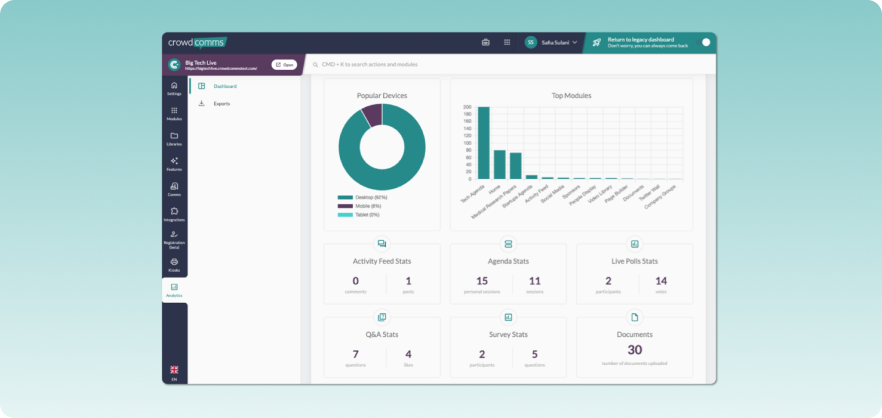
CrowdComms is a cloud-based event technology platform that covers virtual, hybrid, and in-person events.
It gives organizers tools for registration, branded event apps, live streaming, badge printing, and attendee engagement features like polling and Q&A.
The platform is highly customizable, letting you tailor apps and event pages to match your brand. CrowdComms has been around since 2011, and their support team is a consistent highlight among users.
Key features
- Branded event apps: You get customizable mobile apps with personalized agendas, push notifications, networking tools, and one-to-one messaging for attendees.
- Virtual and hybrid event platform: Supports live streaming, breakout rooms, chat, voting, and networking so remote attendees can interact alongside in-person ones.
- On-site badge printing and check-in: Kiosk-based badge printing with attendee tracking at the venue. The system is contactless and handles check-ins quickly.
- Attendee engagement tools: Live polls, Q&A sessions, gamification, and a social activity feed to keep interaction going throughout the event.
Pros
- Strong customer support with dedicated account managers
- Flexible branding and customization options
- Works well for hybrid and virtual events at scale
Cons
- The container app has usability issues based on user feedback
- Key features often sit behind paid add-ons
- Engagement analytics aren't always accurate, according to some users
Why should you look for CrowdComms alternatives?
CrowdComms is an established event technology platform, yet people start looking elsewhere due to a few recurring pain points.
- Cost: For smaller events or organizations running multiple events throughout the year, the platform’s premium pricing model feels steep.
- Scaling event operations: As events grow in size or complexity, organizers may need tools to manage registration, sponsors, logistics, and reporting alongside attendee engagement.
- Evolving event strategy: Some organizations look for platforms that can support broader event programs over time, offering capabilities like integrated registration, financial management, and exhibitor coordination as their events expand.
With that aside, let’s introduce you to the 7 best CrowdComms alternatives worth evaluating.
Top 7 CrowdComms alternatives to look out for in 2026
| # | Platform | Best for | Starting price | Standout feature |
| 1 | EventsAir | Large-scale events requiring full event management features | Pricing available on request | End-to-end event lifecycle management for in-person, virtual, or hybrid events |
| 2 | Whova | Large-scale corporate events | Custom quotation | Community boards for pre-event attendee networking and engagement |
| 3 | Cvent | Comprehensive event management and marketing | Custom quotation | Built-in venue sourcing with RFP management across thousands of properties |
| 4 | Bizzabo | Organizers wanting granular analytics in on-site events | $499 per user per month, billed annually | Klik SmartBadges for real-time attendee tracking and contact exchange |
| 5 | SpotMe | Organizers with consistent attendees | Custom quotation | Global attendee profiles that consolidate data across multiple events over time |
| 6 | RainFocus | Intricate pipeline attribution to events | Custom quotation | Pipeline attribution tracking that links sessions and events to actual deals |
| 7 | vFairs | Large-scale virtual and hybrid events | Custom quotation | Immersive 2D and 3D virtual environments replicating physical event spaces |
1. EventsAir
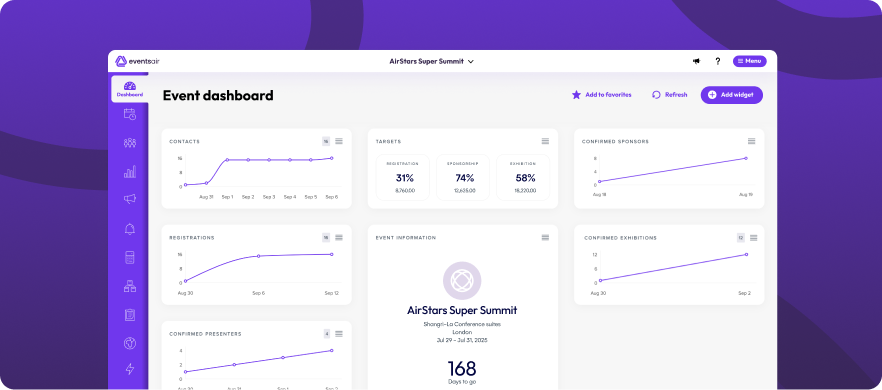
EventsAir is a comprehensive event management platform designed for organizers running complex in-person, hybrid, or virtual events. The platform supports the full event lifecycle – from registration and attendee logistics to sponsor management, on-site operations, and post-event reporting.
This makes it particularly well-suited for conferences, association events, and multi-day programs where planners need tools to manage both the attendee experience and the operational side of event delivery within a single system.
Key features
- Comprehensive attendee management: EventsAir lets you manage and track attendee journeys before and after registration (travel, hotel, dietary requirements, accessibility).
- Multiple check-in technologies: Different types of check-in technologies support (self-service kiosks, staff-managed, automated beacons, etc.)
- Portals for sponsors and exhibitors: Portals for sponsors and exhibitors, with sponsors getting detailed analytics past the event
- Built-in financial management: Handles budgeting, reporting, payments, and more from within the platform.
- Automated workflows for emailing and communication: You can segment attendees by registration type, session attendance, survey responses, or custom fields and send them targeted emails. SMS capability is also available for relaying time-sensitive information.
- API access and pre-built connectors: They are available for integration with the rest of your system.
- Ability to clone events for the next iteration: You can also modify the clones. The system stores event data annually as part of your subscription.
- Native mobile apps for attendees and organizers: EventsAir offers fully branded mobile apps available on both iOS and Android. Attendees can view schedules, create personalized agendas, participate in live polls, network with other participants, and receive real-time updates.
Pricing
EventsAir's pricing isn't publicly listed on their website, so you'll need to reach out to their team for a custom quote.
Pros
- Eliminates the need for multiple tools
- Outstanding reporting
- Event cloning and ready-to-use templates save
- Base license includes native mobile apps, badge printing, and exhibitor tools
Cons
- Steep learning curve, but expertly supported by EventsAir Academy and hands-on training
2. Whova
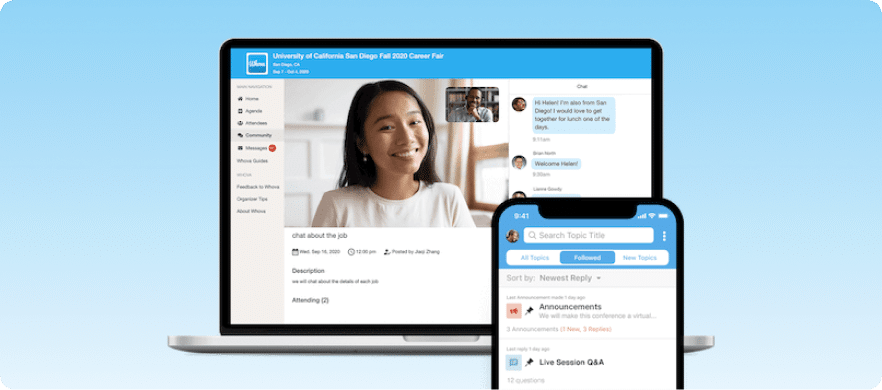
Whova is a Crowdcomms alternative with a big emphasis on simplicity. It offers a community board where attendees can start conversations and form interest groups before the event even starts.
There’s Zoom integration for virtual and hybrid events. If the available integrations don’t meet your needs, you can request content libraries. But don’t expect much from Whova’s virtual experience. It covers the basics only. If virtual is a priority, explore dedicated virtual event platforms instead.
Key features
- Community boards and discussion forums: Attendees can start conversations and form interest groups before, during, and after events.
- Personalized agenda builder: Let attendees build their own schedules based on the sessions they want to attend.
- Live polling and Q&A: Interactive sessions with results displayed in real-time.
- Lead capture and retrieval tools: Exhibitors and sponsors can scan and collect attendee information on the spot.
- Self-service check-in kiosks: Attendees check themselves in without waiting in lines.
- Virtual event streaming: Basic streaming support for remote attendees via Zoom integration.
Pricing & free trial
Whova doesn't publish pricing publicly either. You'll need to request a quote, though they do offer a free trial on request.
Pros
- Good attendee networking features
- Interface is intuitive for both attendees and organizers
- Video-on-demand capabilities
Cons
- Limited customization (event websites, registration pages, etc.)
- Users complain of notification overload
- Limited desktop functionality
3. Cvent
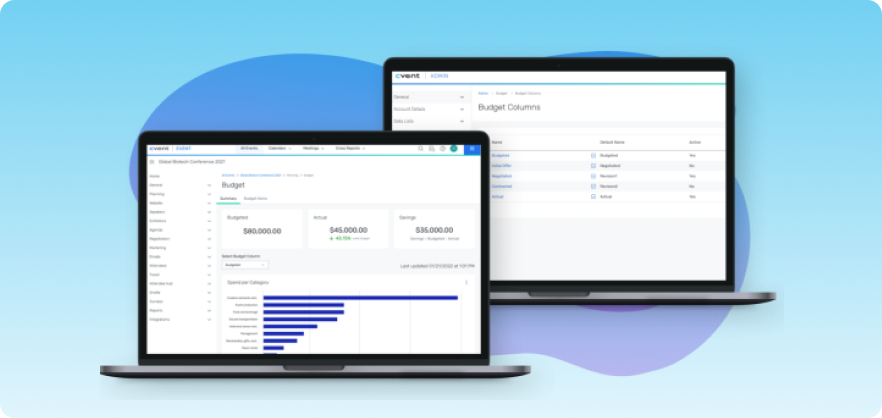
Cvent has comprehensive features and extensive integrations. That’s why it’s for organizations that require sophisticated reporting alongside CRM and event marketing integration and can afford the higher costs that come with it.
Cvent’s venue sourcing tool also deserves mentioning. You’ll find thousands of properties listed on it. The tool lets you send RFPs to multiple venues simultaneously and then manage the contracts you manage to land. Cvent’s mobile app provides standard features and works fine, but don’t expect it to wow you.
Key features
- Advanced registration system: Handles multi-tier pricing, group registrations, waitlists, payment plans, discount codes, and international currencies.
- Venue sourcing network: Thousands of listed properties where you can send RFPs to multiple venues simultaneously.
- Deep CRM integrations: Connects with major CRMs to sync attendee and event data.
- Custom reporting dashboards: Build and customize reports to track the metrics that matter to your events.
- Email marketing automation: Create and schedule targeted email campaigns tied to your event workflows.
- OnArrival suite: Covers badge printing, session tracking, and real-time onsite management.
Pricing & free trial
Cvent offers custom pricing based on the features and plan type you need. You'll have to get in touch with their sales team for specifics.
Pros
- Comprehensive platform
- Robust CRM integrations
- Excellent venue sourcing tools
Cons
- Requires significant training
- High cost based on customer feedback
- Small changes require more steps than necessary
4. Bizzabo
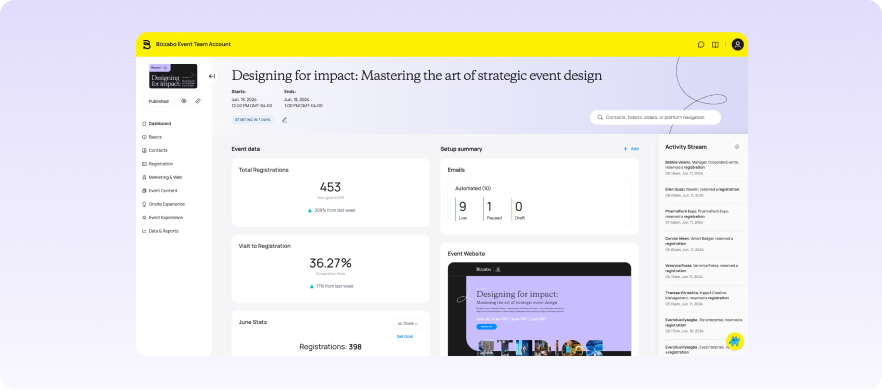
Bizzabo is a modern Crowdcomms alternative specifically for B2B conferences and corporate events. Just like the website’s interface, the Bizzabo platform also feels contemporary. You get an intuitive no-code builder where you can craft modern-looking event websites, emails, and registration pages without needing a dedicated web developer.
Whatever data the device generates flows back to organizers in real-time. This data lets them see things like which booths generate traffic and which attendees are highly engaged, for example. The device can also work with any event registration software or their mobile app.
Key features
- Klik SmartBadges: Wearable devices that let attendees exchange contacts, download content, and track networking activity in real-time.
- No-code website and email builder: Craft modern-looking event websites, emails, and registration pages without a developer.
- Native virtual studio: Includes broadcast controls, audience reactions, breakout rooms, and Q&A management.
- AI-powered attendee matchmaking: Matches attendees based on interests and schedules 1:1 meetings automatically.
- Dedicated sponsor portal: Sponsors manage their own presence and track performance metrics.
- Return on Event (ROE) analytics: Measures event impact beyond surface-level attendance numbers.
Pricing & free trial
Bizzabo's pricing starts at $499 per user per month, billed annually. There's no single-event licensing option.
Pros
- Intuitive interface
- Klik SmartBadges ends ROI blindspots
- Effective networking tools
Cons
- Learning curve exists
- Annual subscription required for the entire event portfolio
- No single-event licensing
5. SpotMe
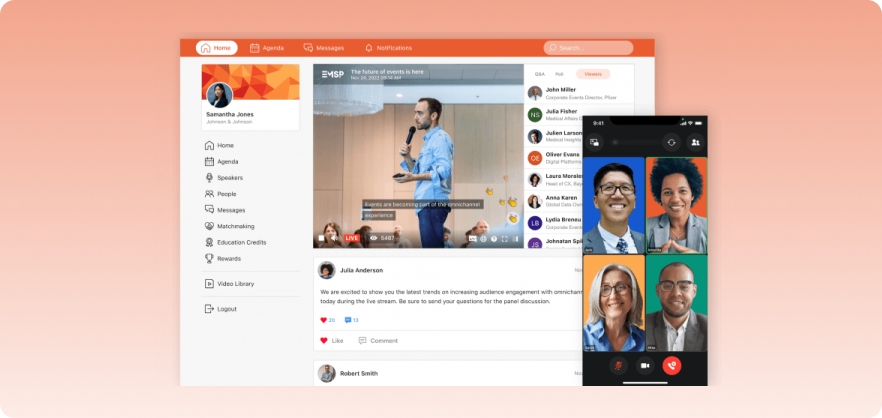
SpotMe is a CrowdComms alternative for organizations where events feed directly into sales pipelines and marketing automation. You’ll find it of great help in conferences where VIPs, sponsors, exhibitors, and regular attendees all need different experiences. That’s because the platform lets you create personalized attendee journeys at scale.
You can customize what attendees see based on their role, interests, and behavior. Setting up this level of customization requires work, but that work eventually pays off.
Key features
- Global attendee profiles: Consolidates data from multiple events over time so organizers can engage attendees based on long-term history.
- Gamification features: Drives participation through challenges, leaderboards, and rewards.
- Social feed moderation: Control and curate attendee posts and interactions in the event feed.
- CRM and marketing automation integrations: Connects directly with your sales and marketing stack.
- Unlimited secure streaming hours: No caps on live streaming for virtual or hybrid events.
- White-glove services: Includes onsite coordinators and live Q&A moderation.
Pricing & free trial
SpotMe keeps its pricing off the website. You'll need to contact their team for a custom quote.
Pros
- Exceptional personalization capabilities
- Higher attendee participation due to Gamification and engagement
- Customizable branding
Cons
- High pricing based on customer reviews
- Complex backend
- Dashboard lacks intuitive insights
6. RainFocus
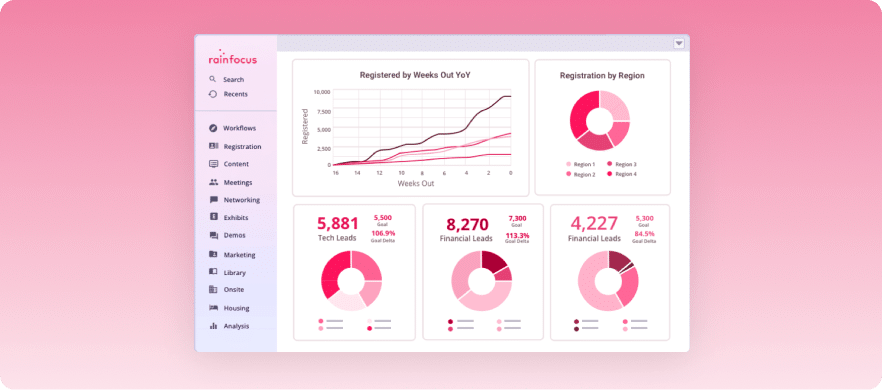
RainFocus is for organizations that treat events as a connected ecosystem and need to prove event ROIs to CFOs using performance metrics. The platform tracks how events contribute to actual pipeline growth. For instance, you can see which sessions influenced deals, which attendees converted to customers, and how event spending correlates with revenue.
RainFocus, like other Crowdcomms alternatives, also offers branching registration forms. They present relevant questions based on attendee responses and hide irrelevant ones.
Key features
- Pipeline attribution tracking: Track which events and sessions influenced actual deals.
- Dynamic registration forms: Present relevant questions based on attendee responses and hide irrelevant ones.
- Speaker content moderation: Review and manage speaker submissions before they go live.
- Event cloning and template library: Carry forward branding, registration flows, email sequences, and reporting dashboards to future events.
- Native CRM and marketing automation integrations: Connects with major platforms out of the box.
- Comprehensive budgeting tools: Track event spending and correlate it with revenue outcomes.
Pricing & free trial
RainFocus doesn't list pricing publicly. You'll need to request a custom quote from their sales team.
Pros
- Distinctly reports each event's impact on the pipeline and revenue
- Strong portfolio management
- Highly customizable workflows for complex event processes
Cons
- Dated interface
- Setup requires significant configuration work
- Attendee-facing app isn't intuitive for less tech-savvy users
7. vFairs
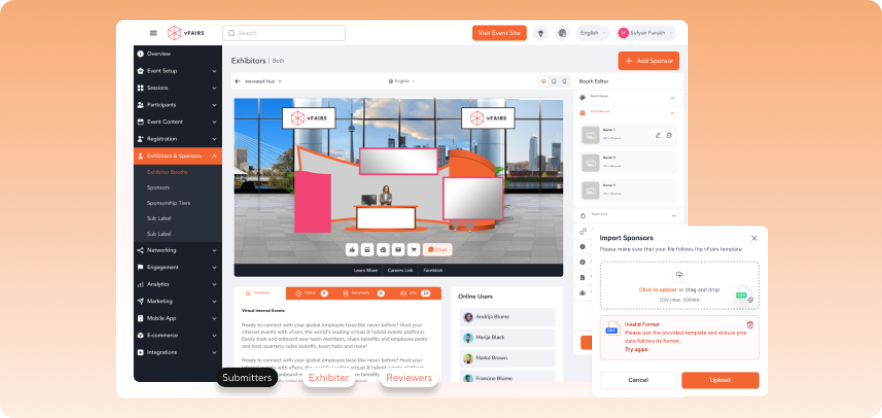
vFairs specializes in creating immersive virtual environments that replicate physical events.
The platform offers 2D and 3D virtual venues, including lobbies, exhibition halls, auditoriums, and networking lounges.
Instead of flat registration pages and video grids, attendees navigate through customized virtual spaces. They walk into exhibit halls, visit sponsor booths, and enter auditoriums for sessions.
That said, the platform supports a wide range of in-person events equally.
Registration, ticketing, badge printing, QR code check-in, and lead capture all work through the same system.
The backend requires HTML and CSS knowledge for advanced customization. Basic changes work through the interface, but organizations wanting specific designs often need technical skills or rely on vFairs' team to implement requests.
Key features
- Immersive 2D and 3D virtual environments: Attendees navigate through customized lobbies, exhibition halls, auditoriums, and networking lounges.
- Drag-and-drop registration builder: Set up registration forms without needing technical skills.
- Exhibitor self-service portals: Exhibitors manage their own booth content and lead capture independently.
- Live streaming integration: Stream sessions directly within the virtual event environment.
- Dedicated project managers: White-glove support to guide you through setup and execution.
- Gamification features: Keep attendees engaged through challenges and interactive elements.
Pricing & free trial
vFairs uses custom pricing, so you'll need to reach out to them directly for a quote based on your event requirements.
Pros
- Makes virtual events engaging
- Strong exhibitor tools
- Highly customizable branding
Cons
- HTML and CSS knowledge required for advanced customization
- Setup can be time-consuming
- Attendees sometimes complain about needing to re-enter their email for each session
How to choose the best Crowdcomms alternative?
Here are some of the things you should keep in mind before or while selecting a Crowdcomms alternative for your events.
1. Event duration
Will you be running single isolated events or managing an ongoing portfolio? A platform that is optimal for occasional conferences won't be able to meet the needs of quarterly or year-round events.
2. Pricing structure
A clear event pricing strategy is also important to consider. It helps you evaluate total cost, including transaction fees and per-attendee charges, not just base pricing. A platform with higher monthly fees but lower transaction costs often ends up cheaper for large events.
3. Setup speed
How critical is time in setting up your events? If you need quick launches or last-minute changes, avoid platforms requiring, for example, three-week app store approvals or complex configurations.
4. Technical requirements
Choose drag-and-drop builders if your team isn't technical. Extensive customization sounds appealing until you realize it requires programming knowledge.
5. Integration requirements
Verify native connectors exist with your CRM and marketing tools rather than assuming everything will work together smoothly.
Streamline your event planning with EventsAir
Each platform on this list solves a different problem. Some are better for virtual events, others for pipeline tracking or attendee networking. The right pick depends on what your events actually need.
But if you're looking for a platform that covers the entire event lifecycle without stitching together multiple tools, EventsAir is worth a serious look. From registration and check-in to reporting and post-event analysis, everything runs through one system. That alone saves a significant amount of time and coordination headaches.
Ready to see how it works? Request a demo today.
FAQs
1. Which is the best platform among all Crowdcomms alternatives?
Overall, when it comes to feature-richness, user-friendliness, and value for money, EventsAir is the best Crowdcomms alternative out there. It is best suited for large-scale events that require full event management features. The standout part is that it handles the entire event lifecycle with ease and stays equally involved even after the event ends.
2. Why look for Crowdcomms alternatives in the first place?
Crowdcomms, while being a decent platform with plenty of satisfied customers, isn’t a perfect fit for everyone out there. It has issues such as premium pricing, platform complexity, and vendor lock-in, among others, that push users to look for alternatives.
3. What are the leading Crowdcomms alternatives?
The leading Crowdcomms alternatives include EventsAir, Whova, Cvent, and Bizzabo, to name a few. There are other alternatives as well, such as SpotMe and RainFocus.
4. Can I integrate these alternatives with existing tools?
Most platforms on this list offer native integrations with popular CRMs, marketing automation tools, and payment systems. If a native connector isn't available, several of them also provide API access so you can build custom integrations with your existing stack.
See EventsAir in action
Discover why 12,000+ event professionals trust EventsAir to deliver effortless events, every time.




Ready to transform event chaos into clarity?
With EventsAir, you’ll move from chasing logistics to creating unforgettable moments. Plan faster, act with confidence, and deliver exceptional events. Discover what’s possible with a personalized demo today.