

Cvent Pricing: What's Public, What's Not, and What Drives the Cost

.png)
If you’ve searched for Cvent’s pricing, you’ve probably noticed there’s no price list. You fill in a form, and a quote comes back built around your products, your team, and your events.
That’s common for enterprise event software, but it makes budgeting hard. This guide explains what Cvent does share, what shapes your quote, and the questions worth asking before you sign. It also shows how a connected platform like EventsAir approaches pricing differently.
The short answer: Cvent offers two license levels, Professional and Enterprise, but publishes no dollar figures. Your cost depends mainly on which modules you license, how many people need access, and how many events you run.
What is Cvent?
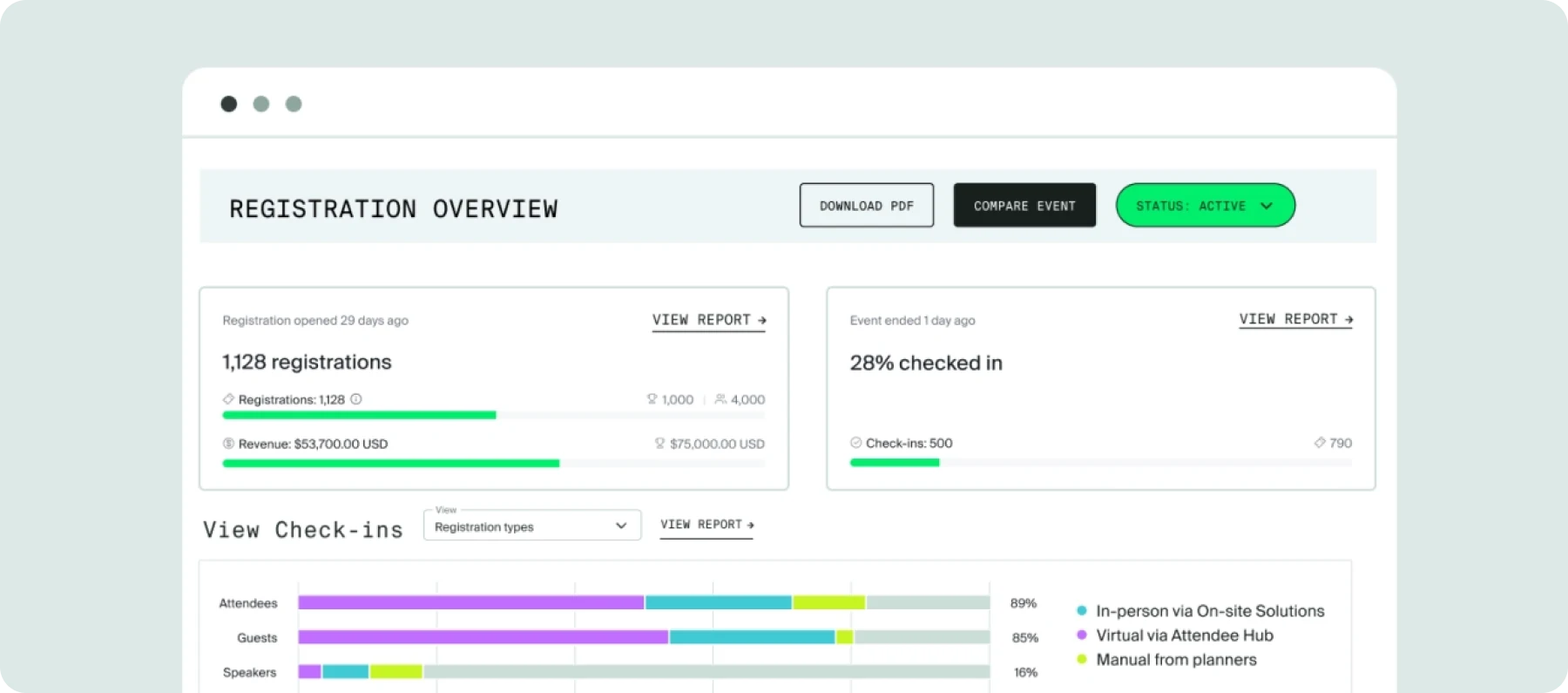
Cvent is an event management platform built for large, complex organizations. Enterprise marketing teams, associations, and professional conference organizers running high-volume, multi-track events are its core users.
It's also a suite of more than two dozen individually licensable tools, spanning registration, onsite check-in, virtual and hybrid delivery, and post-event reporting. That modular structure is exactly why its pricing gets complicated fast.
Cvent's pricing model: What's actually public
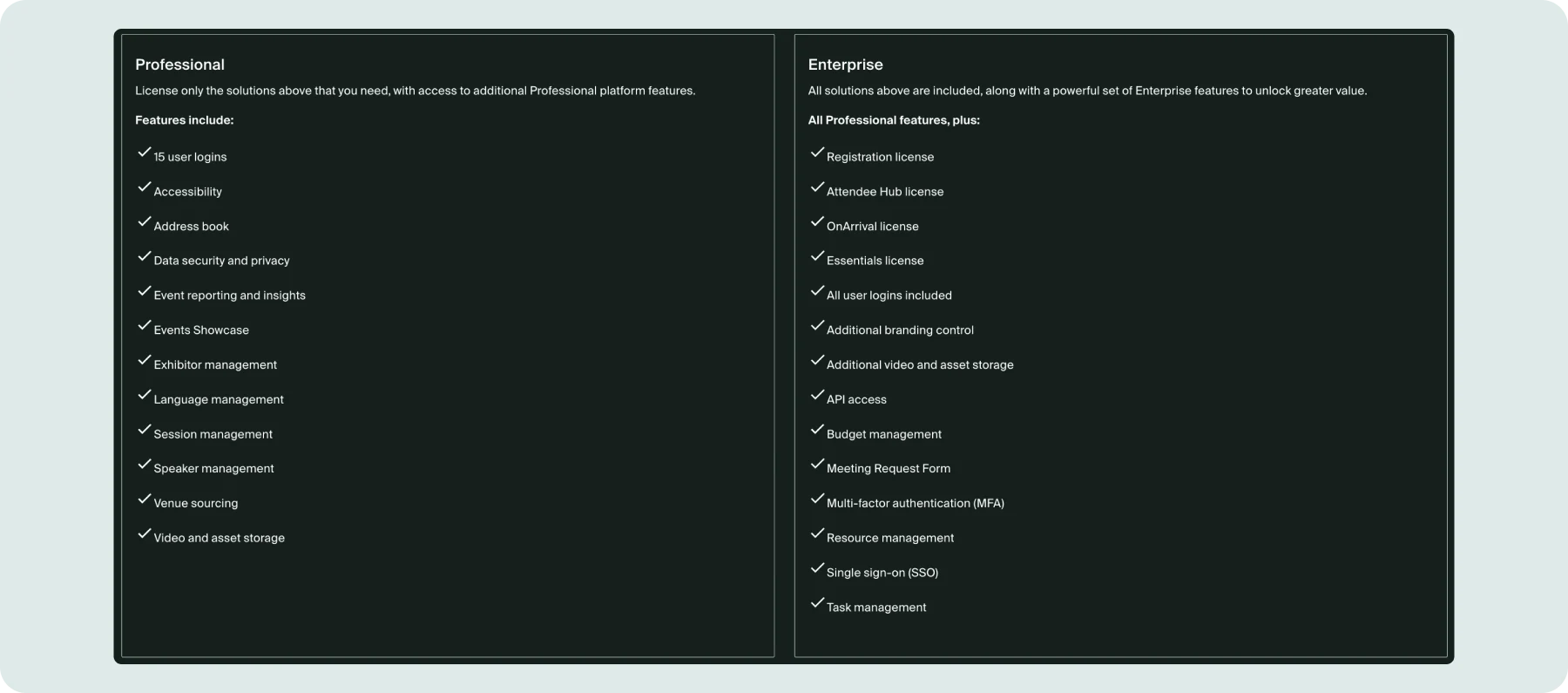
Cvent’s quotes are built from three parts: an annual license, a per-registrant fee, and an implementation fee.
The license comes in two levels:
- Professional: Lets you license individual solutions, such as Registration, Attendee Hub, or OnArrival, on their own. It also comes with 15 user logins and the core platform features for whichever products you pick.
- Enterprise: Includes every Cvent solution in one license, with unlimited user logins and advanced features like single sign-on, API access, and budget management folded in.
On top of the license, Cvent charges a fee for each person who registers. That means your cost rises with attendance, not just with the number of events you run.
To get a number for any of it, you request a quote through a contact form. Nonprofits can also ask about special rates.
Cvent's products and modules: What you're licensing
Beyond its standard pricing, Cvent offers nearly 30 named products and modules you can add on top of the platform, spanning the full event lifecycle.
- Pre-event: These modules cover the work that happens before an event. They include registration & marketing, Cvent Supplier Network for venue sourcing, abstract management for call-for-papers, exhibitor management, and budget management.
- During the event: Planners use these modules to manage attendee engagement and onsite operations. Here they can get attendee hub for web and mobile engagement, event app, virtual events platform for streaming, and on arrival for onsite check-in and badge printing.
- Post-event: With these modules, event management teams can measure results and follow up after the event. Users can access event reporting, surveys & feedback, and Cvent LeadCapture for exhibitor lead retrieval.
Under Professional, none of these are bundled by default. You license the ones you need, and the final quote reflects that. It’s one reason two organizations can pay very different amounts for what looks like the same platform.
What drives up your Cvent cost
Now that we’ve looked at the modules and understand them a bit better, let’s look at a few things that shape the number a Cvent rep eventually gives you, beyond the two-tier system on the page.
- Which modules you license: The most obvious one is the modules, as we discussed in the last section. For instance, Registration alone costs less than Registration plus Attendee Hub plus OnArrival, because you're paying for each solution you add under Professional.
- How many people register: With a per-registrant fee, a bigger turnout means a bigger bill.
- How many people need access: Professional caps you at 15 logins. Need more, or admin controls like SSO and API access? That pushes you into Enterprise, a materially different price point.
- How complex and how many events you run: A single annual conference is a different scope than a PCO or association running a dozen events a year. Cvent prices around that scope case by case, in the sales conversation.
- Whether you qualify for nonprofit rates: Cvent's own site confirms special pricing for nonprofits, associations, government, and higher education worth asking about directly if you fall into one of those categories.
Implementation and add-on costs to expect
Cvent doesn’t publish implementation costs either. Setup and onboarding typically cover platform configuration, data migration from your previous system, and training on the modules you licensed.
Because this depends on how much customization you need, it can vary widely from one quote to the next. Treat any third-party estimate as a rough planning range until your rep gives you a locked number.
Takeaway: Ask for the license, per-registrant fees, and one-time setup costs as separate lines before you sign anything.
When Cvent fits, and when a connected platform works better
Cvent’s modularity suits organizations that need one piece of the event lifecycle. For teams running conferences, association meetings, and hybrid events, it can become overhead. Every added module is another line on the quote, another set of permissions, and often another place your attendee data lives.
EventsAir takes a connected approach. Registration, finance, communications, agenda, accommodation, onsite tools, and reporting all run on a single platform and share one data layer. Instead of deciding which modules to buy, you decide how much of the platform to use, and you can expand into more of it as your events grow.
Here’s what that looks like in practice:
- One record for every attendee: Each contact has a 360° view covering registration, payments, communications, accommodation, dietary needs, and survey responses.
- Unlimited registrations: Build multi-path journeys with conditional logic, member pricing, group bookings, and embedded payments. Registrations are unlimited on every plan, so a growing event doesn’t change your licence cost.
- Air Intelligence: EventsAir’s built-in AI assistants support planners and attendees across the event lifecycle. Planner Assistant answers plain-language questions using your live and historical event data, covering registrations, revenue, sessions, and more. Attendee Assistant guides attendees and recommends sessions inside the App, and Content Assistant drafts on-brand event communications.
- Onsite check-in tools: Self-service and staffed check-in, QR scanning and badge design technology, as well as real-time check-in statistics are all part of the platform.
- Mobile apps for attendees and organizers: The white-labeled Attendee App covers personalized schedules that update in real time, smart meeting matching and QR-code networking, live polls, Q&A, and surveys, and gamification with points, badges, and prizes.
- Sponsors and exhibitors: Track packages, deliverables, payments, and booth bookings, with self-service portals and lead capture built into the Attendee App and available to all relevant sponsors and exhibitors.
- Abstracts, speakers, and continuing education: Manage submissions, reviews, and presenter portals, then push approved sessions straight into the agenda, website, and app. Connectors for AMS platforms such as Membes and iMIS can log CPD or CE points automatically.
- Finance and payments: Native budgeting, invoicing, and multi-currency support sit alongside EventsAir Pay, with Smart Connectors for Xero, MYOB, QuickBooks, and Sage.
- Reporting and analytics: 150+ purpose-built reports and customizable dashboards draw on the data from every module above.
- Air Intelligence: EventsAir’s AI suite sits on the same data layer. The Attendee Assistant answers questions and recommends sessions inside the event app, and the Content Assistant drafts on-brand event communications.
- In-person, virtual, and hybrid: OnAIR provides 3D virtual environments and AIRCast Studio handles broadcast production, so one platform covers every format.
How EventsAir pricing works
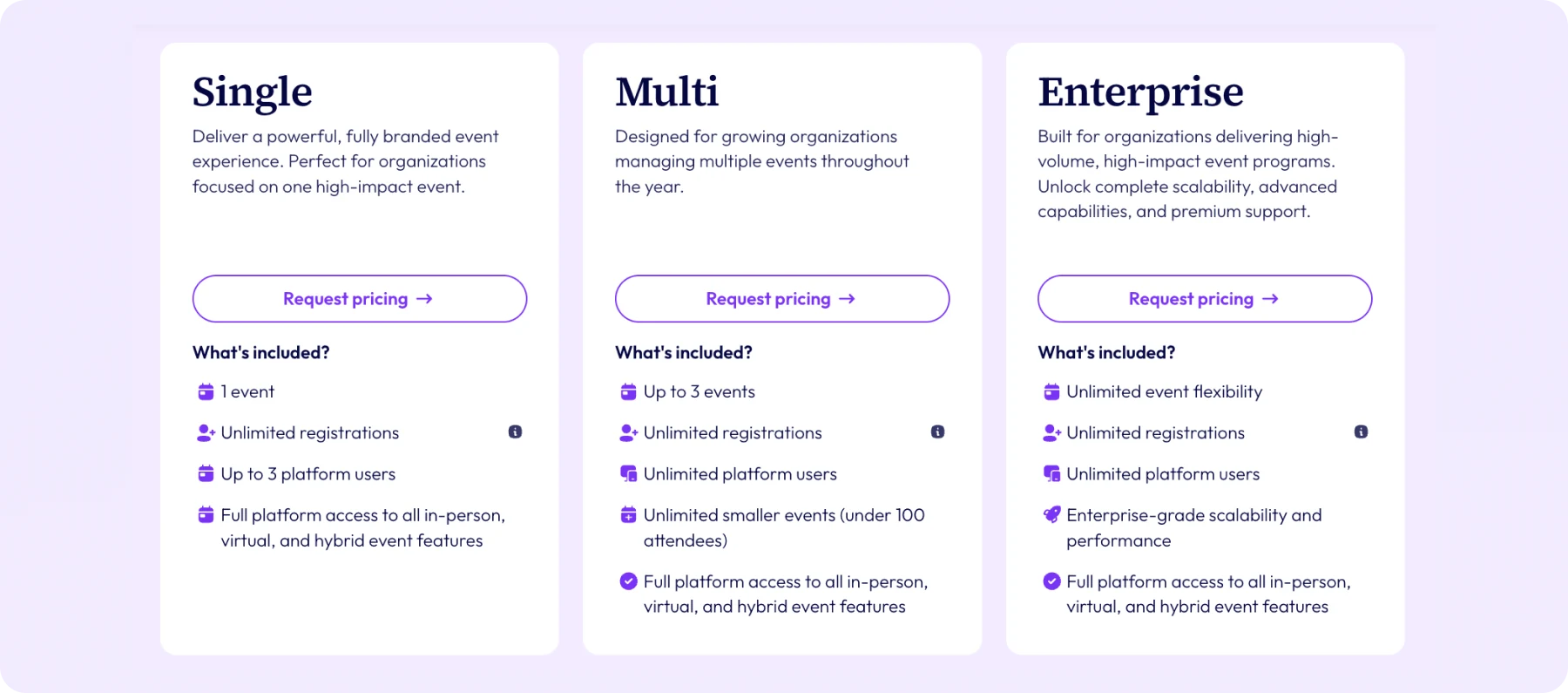
Like Cvent, EventsAir doesn’t publish a price. The difference is what the quote is built from. There are three plans, and all include every feature:
- Single: For one event, with unlimited registrations, standard support, and three users.
- Multi: For organizations running multiple events a year. It includes three events (with more available), unlimited users, and premium support.
- Enterprise: Everything in Multi, with custom event programs for more complex needs.
Because every plan includes the full platform, growing your events means using more of it, not buying more of it. A small number of services are optional paid extras, including custom domains, Smart Connectors, Event Build, and Event Success Services.
Choose a quote that doesn't grow with every module
Both Cvent and EventsAir price by quote rather than a published rate card. The question is what you’re quoting from: a list of modules and registrant fees to assemble, or one connected platform to grow into.
Want to see how that compares with what you’re being quoted today?
Request pricing or book a demo today from EventsAir.
FAQs
1. Does Cvent publish its pricing?
No. Cvent's own pricing page names two license levels, Professional and Enterprise, but doesn't publish dollar figures for either. You have to request a quote through their contact form to get a number.
2. What's the difference between Cvent's Professional and Enterprise plans?
Professional lets you license individual solutions with up to 15 user logins and core features. Enterprise includes every Cvent product with unlimited logins, plus advanced features like single sign-on and API access.
3. What determines how much Cvent costs?
A quote typically combines an annual license, a per-registrant fee, and an implementation fee. The main drivers are which modules you license, how many people register, how many people need logins, and how complex your events are.
4. Does Cvent charge per registrant?
Yes. Cvent’s own marketplace listing describes its pricing as an annual license fee plus a per-registrant fee.
5. Does Cvent charge extra for implementation?
Cvent doesn't publish implementation costs on its site, so it's worth asking your rep for a breakdown of one-time fees, kept separate from the license, before signing.
6. Is there a simpler alternative to Cvent's modular pricing?
Yes. EventsAir is a connected, all-in-one platform where every plan includes the full feature set and unlimited registrations. Request a quote to compare it directly with what you’ve been offered.
See EventsAir in action
Discover why 12,000+ event professionals trust EventsAir to deliver effortless events, every time.





Ready to transform event chaos into clarity?
With EventsAir, you’ll move from chasing logistics to creating unforgettable moments. Plan faster, act with confidence, and deliver exceptional events. Discover what’s possible with a personalized demo today.