

Custom-Built Vs Off-The-Shelf Event Platforms: How to Choose in 2026


It usually starts with a frustration. A registration page that buckled on launch day, or a third conference where speaker details lived in a shared spreadsheet. Then someone on your team says it: "Couldn't we just build this ourselves with AI?"
It's a fair question. AI coding assistants have made building software far more accessible, and with budgets under pressure, the idea is hard to ignore. In this guide, we'll compare custom-built and off-the-shelf event platforms, look at what AI really changes, and help you decide which path suits your events.
In short: a custom-built platform is software your team creates or commissions, while an off-the-shelf platform is ready-made software you configure. AI has made building faster and cheaper, but running, securing, and connecting that software is still the hard part. For most event teams, an all-in-one platform is the stronger choice, while custom tools earn their place for genuinely unique needs or small, low-risk additions.
What's the difference between custom-built and off-the-shelf event platforms?
Both paths cover a wide range, so it helps to know where each option sits before you compare them.
Custom-built: from bespoke platforms to vibe-coded tools
Custom-built means your team owns the code, and that can take two very different forms. A bespoke platform is built by in-house developers or an agency around your exact requirements. A vibe-coded tool is built by an event manager or small team using AI coding assistants – like Lovable or Cursor – often without a traditional development background.
Off-the-shelf: from entry-level tools to all-in-one platforms
Off-the-shelf means someone else builds and maintains the software, and you configure it to suit your events. At one end are entry-level, single-purpose tools such as ticketing apps and form builders. At the other are all-in-one event management platforms that cover registration, abstracts, sponsors, check-in, mobile apps, attendee engagement and reporting in one system.
Can you build an event platform with AI?
You can certainly build parts of one. Whether you should build all of it is a different question.
A registration form, microsite or simple dashboard that once needed a developer is now within reach of a confident non-developer. That's a real shift, and it's why this conversation keeps coming up in event teams.
What can non-developers build with AI today?
More than you might expect.
Vibe coding is building software by describing what you want in plain language and letting an AI assistant write the code. You might type, "Create a registration page with member and non-member pricing," and a working version appears in minutes.
From there, you refine it by chatting rather than programming. AI coding assistants can generate full applications this way, AI app builders turn a description into a hosted, shareable tool, and many no-code platforms now handle setup for you.
For example, an event manager could put together a delegate directory, a simple check-in screen or a branded microsite over a weekend, without opening a code editor. For lightweight, low-stakes tools, that's a real advantage.
Why a working prototype isn't a finished platform
Here's where it gets tricky. These tools are very good at producing something that looks finished. The screens load, the buttons work and the demo goes well, which is exactly why building feels so easy.
But a prototype only shows you a straightforward path. It doesn't show you what happens with 3,000 delegates, a payment dispute or a last-minute agenda change. That gap between "it works" and "it's ready for event day" is where the real risk sits.
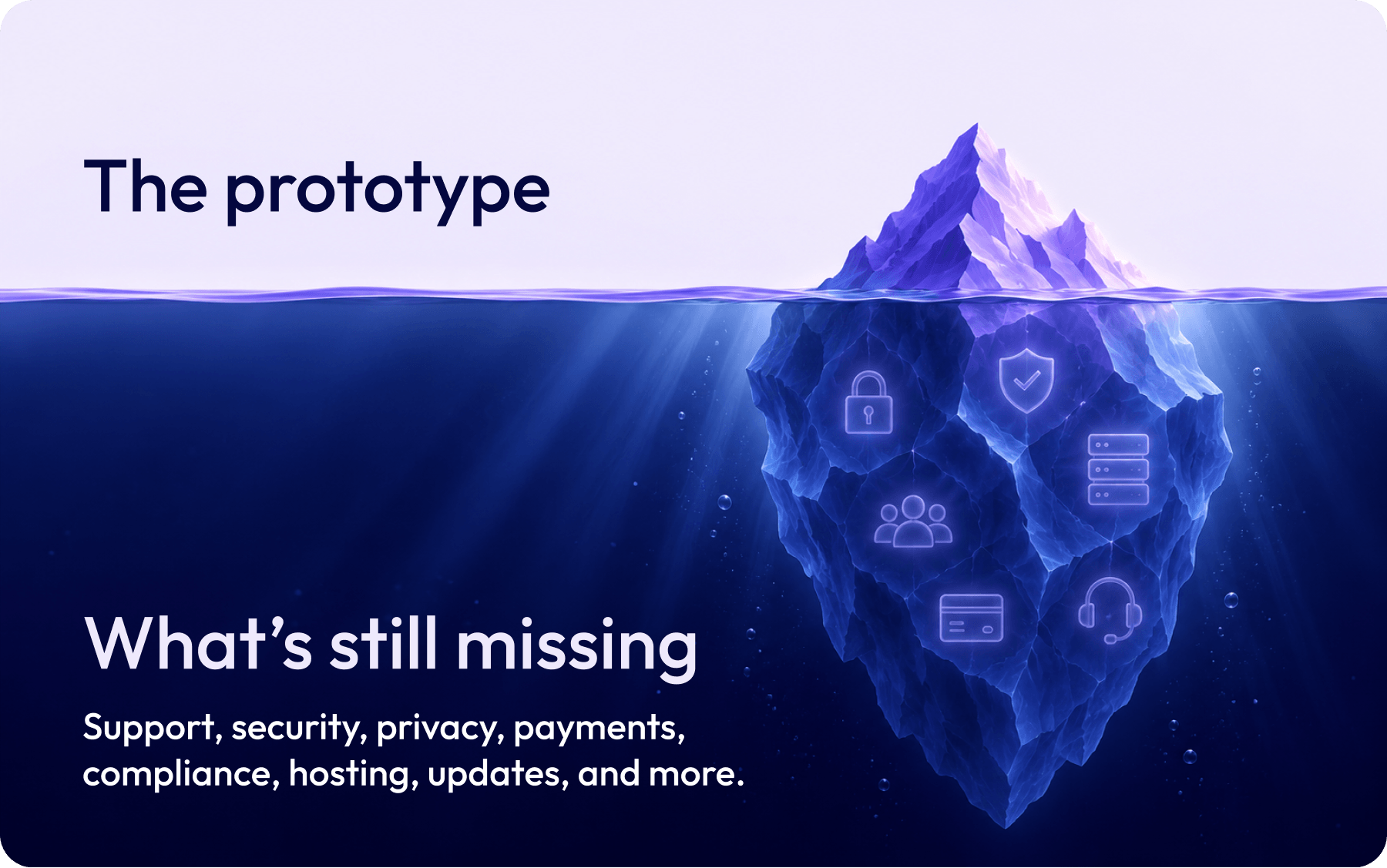
What AI-built event software still doesn't solve
A working prototype isn't the same as a production-ready event platform. The gap shows up once real attendees, real payments, and real deadlines are involved.
Event day performance is unproven until it's too late
Events are unforgiving. Registration opens at a fixed time, thousands of delegates check in within the same hour, and a keynote goes live to a remote audience. You can't reschedule any of it.
A custom-built tool won't reveal how it performs under that pressure until the moment arrives. The only way to reduce the risk is rigorous load testing before the event, which is specialist work that most teams don't plan for.
A platform proven across real events has already been through that.
Payments, privacy and security
Taking payments brings PCI obligations, and holding attendee data brings privacy law, data residency and breach responsibility. Platforms built for events carry these as part of the product.
EventsAir, for example, runs on Microsoft Azure with SOC 2 Type II, PCI-DSS Level 1, GDPR and ASD Essential 8 Level 3 compliance, plus a dedicated database for each client. A custom build starts with none of that in place.
Ownership, expertise and what happens when someone leaves
Custom software depends on the people who understand it. If you have an event planner with real coding knowledge, that's a significant advantage. They can shape the tool around your workflow and fix problems quickly.
But it also concentrates the risk in one person. If they change roles, who can maintain the code? And if the tool was generated by AI, who can read it when something breaks on event morning?
Even without that scenario, ongoing ownership means:
- Patching and updates. Hosting, dependencies and security fixes never stop.
- Changes to third parties. Payment gateways and APIs change, and your tool has to keep up.
- Support during live events. Someone needs to be reachable when it matters, not just during office hours.
Connected data and one place to work
Complexity isn't really about how long your feature list is. It's about how many moving parts need to stay in sync, and how many places your team has to go to manage them.
For example, a keynote moves from 9:00 to 10:30. On a connected platform, you change the agenda once, and the event website and attendee app reflect it straight away. On a patchwork of tools, that's several manual edits, and each one is a chance for error.
The same applies to access. In a connected system, your team, speakers, sponsors and attendees work from one record, with one set of permissions. You aren't juggling logins across a registration tool, a spreadsheet, an app and an email platform, and you have a single source of truth when someone asks, "Where does this stand?".
When should you build your own event tool?
There are situations where building is the right call, and being upfront about them makes the rest of this guide more useful.
- You have genuinely unique technical needs. If your format requires something no platform supports, custom development may be the only route. This is rare for conferences, congresses and agency-run events.
- Event technology is your product. If you sell event software, or you're a large venue operator running proprietary ticketing at scale, owning the code makes sense.
- You need a lightweight tool alongside your platform. This is where AI-assisted building shines. Think of a branded microsite for a one-off activation, a custom dashboard, or a simple internal tool for one workflow. If you have a technical team member, an API can feed these tools live event data. Keep them read-only wherever possible, so that if one breaks, your registrations, payments and check-in keep running.
That last group is low-risk, short-lived and easy to replace. These tools don't need to carry your registrations or your payments, which is what makes them a good fit. If building the whole platform isn't the right move, the next question is what kind of off-the-shelf option to choose.

What should you look for in an off-the-shelf event platform?
Off-the-shelf software ranges from simple single-purpose apps to platforms built for complex events. The more useful question is whether a platform can handle the moving parts of your events without making your team the glue between tools.
One system and one data layer
Look for a platform where registration, abstracts, sponsors, check-in, engagement and reporting share the same data. When everything sits in one place, a change made once appears everywhere, and your team works from one set of logins and permissions.
If you're juggling more than three tools per event, or sponsor and board reports mean exporting CSVs, that's a sign your current stack is working against you.
Configurable without code
Your registration paths, pricing tiers, forms and reports should be adjustable by your event manager, not a developer. For example, you should be able to set different pricing for members and non-members, or change a form field a week before the event, without waiting for additional assistance or workarounds.
Proven at the scale you'll face
Ask how the platform performs at your peak moments, not just in a demo. A platform with a track record across thousands of events has already met the registration rushes and check-in surges you're worried about. Looking for customer success stories that align with your event delivery.
Connects to the tools you're keeping
No platform replaces everything, and it shouldn't have to. Check that it connects to the CRM, AMS and accounting tools you already rely on, so data flows without manual exports.
At EventsAir, Smart Connectors link systems like HubSpot, Salesforce, Microsoft Dynamics 365, Xero and QuickBooks without code, while our Open API and Enterprise API support custom development and high-volume, real-time data flow. Explore our event integrations to see what's available.
Support and training for your whole team
Ask who helps when something goes wrong at 7am on event day, and how new staff get up to speed. Responsive support and training resources reduce the need to build technical capacity in-house.
Should you choose custom or off-the-shelf?
There's no universal answer, but there is a right answer for your team. It usually comes down to a handful of honest questions about your events, your people and how much risk you can carry on the day. Work through these in order and the path tends to become clear.
How complex are your events?
Complexity isn't just size. It's how many moving parts need to work together: parallel sessions, speaker submissions, sponsor deliverables, multiple registration types, onsite check-in, gamification or engagement, and reporting. The more of these you manage, the more value there is in a system where they all share the same data.
Who will own it when you're busiest?
Think about who builds it, who fixes it, and who picks up the phone when something breaks during registration or onsite. A custom tool needs a named owner and a backup. If the answer is one enthusiastic planner who built it over a weekend, that's a risk, not a plan.
With an off-the-shelf platform, that ownership sits with the vendor. Updates, security patches and compliance are part of the subscription, and at EventsAir, support is available 24/7 on every plan.
What would a failure cost you?
Ask what happens if the tool fails at the worst possible moment. If a broken delegate directory would be an annoyance, building is a reasonable risk. If a failure would stop registration, payments or check-in, the stakes change, because you can't rerun event day.
The impact also reaches well beyond those obvious failures. Think of a dietary requirement that never reaches the caterer, a hotel room block that doesn't match your registration list, or a speaker who isn't told their session has moved. Each one is a logistical problem that attendees feel firsthand, and each one shapes how they remember your event.
Rigorous load testing can reduce that risk, but it takes specialist time most teams don't have. A proven platform gives you a track record instead of a hope.
What's the full cost, including your team's time?
The build is the visible cost. The hidden costs are hosting, security updates, third-party changes, fixes, and the hours your team spends maintaining software instead of running events. These continue for as long as the tool is in use.
Fragmented tools carry a cost too. Impact Events cut its bookkeeping reconciliation from two days a week to two hours after connecting EventsAir to Xero, which freed the team to focus on delivery.
Where does your data need to go?
Event data rarely lives alone. Registrations may need to feed your CRM, AMS or accounting system, and sponsors expect reporting back. With a custom build, each connection is something you create and maintain. With an off-the-shelf platform, look for pre-built integrations and an API for anything custom.
A quick way to weigh it up
For most event teams, the answers point toward off-the-shelf. Custom building earns its place when your needs are genuinely unique, or when the tool is small, low-risk and easy to replace.
Making the right call for your events
AI has made building software easier than it has ever been, and for lightweight tools, that's genuinely good news. But running events is about more than getting something to work.
It's about registration and payments holding up, and just as much about the details attendees feel: finding the right room, getting the right meal, catching the right shuttle and trusting that the agenda in their hand is current. If you weigh complexity, ownership and risk honestly, the right path usually becomes clear.
At EventsAir, we've spent more than 30 years building for exactly this. Our all-in-one platform brings registration, abstract management, sponsors, check-in, engagement and analytics together, with unlimited registrations and no extra fees for the mobile app or badging. That means your team can focus on the event, not the software behind it.
Looking to see how it handles the moving parts of your events? Request a demo with one of our team members today.
FAQs
How do I choose between custom-built and off-the-shelf event software?
Start with how complex your events are, who would own a custom tool long term, and what a failure on event day would cost you. Simple, low-risk, one-off needs can suit a custom tool. Multi-track, recurring events with sponsors, speakers and payments are usually better served by an all-in-one platform.
What is vibe coding for events?
Vibe coding is building software by describing what you want in plain language and letting an AI assistant write the code. For events, that might be a delegate directory, a microsite for a VIP dinner or a simple internal tool for one workflow. It's a fast way to prototype, but anything attendees depend on still needs testing, security and ongoing maintenance.
Can I build an event management platform with AI?
You can build parts of one, such as prototypes, microsites and dashboards. A full event platform also has to handle payments, agenda changes, check-in, accommodation, attendee communications and reporting, all staying in sync. AI doesn't remove the testing, compliance and support that requires.
Is it cheaper to build custom event software or buy it?
Building has become much cheaper, but total cost of ownership is a different matter. Hosting, security, fixes and staff time continue for as long as the tool runs, and that's time your team isn't spending on the event itself. A platform subscription typically covers those costs in one predictable fee.
What are the risks of using vibe-coded software at a live event?
The main risks are security gaps, unclear ownership, limited testing under load and code nobody fully understands. At a live event, those risks show up as slow check-in queues, out-of-date agendas or attendee data exposed. These matter most when the tool handles payments or personal details.
See EventsAir in action
Discover why 12,000+ event professionals trust EventsAir to deliver effortless events, every time.



Ready to transform event chaos into clarity?
With EventsAir, you’ll move from chasing logistics to creating unforgettable moments. Plan faster, act with confidence, and deliver exceptional events. Discover what’s possible with a personalized demo today.